
Perplexity
AI answer engine that responds to questions with sourced answers and can take on longer projects through Computer.
Perplexity is an AI-powered answer engine that responds to questions typed into a search box with direct answers drawn from sources. Perplexity is used by asking a question, optionally choosing a model or adding a connector with the @ key, and reading the reply. A separate Computer mode accepts whole projects and returns finished deliverables.
Best for People who want a direct, sourced answer to a question instead of a page of links, and who sometimes hand off longer research tasks.
- Listed in
- Research & AI SearchAI Chatbots
- Platforms
- Web
- Pricing model
- Freemium
- Free plan
- Yes
- Made by
- Perplexity
- Added
Last verified: . Information taken from perplexity.ai.
What is Perplexity?
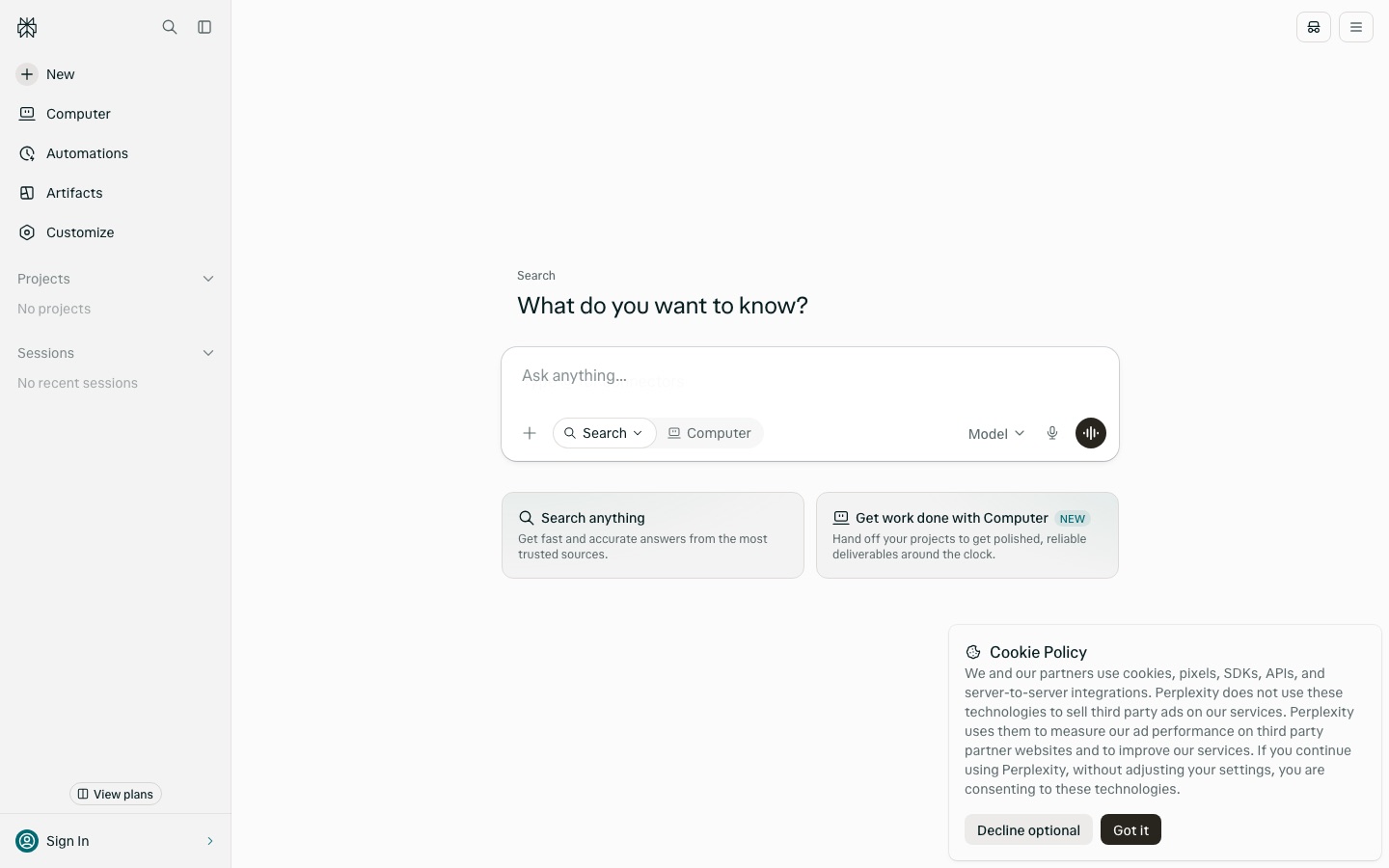
Perplexity is an answer engine: instead of a list of links, it replies to a question with a written answer based on sources it treats as trustworthy, and it describes those answers as real-time. The home screen is a single prompt box with two modes. Search handles questions of any kind, while Computer, marked as new, is meant for handing over a project and receiving a finished deliverable. From the same box you can pick the model that answers, type @ to bring in a connector, or choose to work inside a project. The sidebar adds sections for Automations, Artifacts, Customize, Projects and Sessions, the last of which lists recent activity. Perplexity describes the answer engine as free, and a View plans link in the sidebar leads to its paid options.
Key Features
Search Mode
Answers a typed question directly, drawing on sources instead of returning only links.
Computer Mode
Takes on a project you hand off and works towards a finished deliverable.
Model Picker
Lets you choose which model handles a request from a menu in the prompt box.
Connectors
Brings outside sources into a question when you type @ in the prompt box.
Projects
Groups related work so that a question can be asked inside a specific project.
Sessions and Artifacts
Keeps recent sessions in the sidebar, next to dedicated sections for artifacts and automations.
Use Cases
- Quick Fact Checks
- Ask a specific question and read a direct answer with its sources.
- Background Research
- Explore an unfamiliar topic through a series of follow-up questions.
- Handing Off a Report
- Give Computer a brief and receive a finished document to review.
- Organising Client Work
- Keep the questions for one engagement together in a project.
- Asking Across Connected Tools
- Use a connector to include material from another service in a question.
Things to know
- Computer is newly introduced
- The Computer mode carries a NEW label on the home page.
- Cookies and advertising
- Perplexity says it does not use cookies and similar technologies to sell third-party advertising on its own services; they measure its ad performance on partner sites and help improve the product.
FAQs
What is Perplexity?
Perplexity is an AI-powered answer engine that replies to questions with direct, real-time answers drawn from sources.
What is Perplexity used for?
Perplexity is used for searching and research by asking questions in natural language, and for handing off larger projects through its Computer mode.
Is Perplexity free?
Yes. Perplexity describes its answer engine as free, and the site also links to paid plans from a View plans button.
What is Perplexity Computer?
Computer is a Perplexity mode for delegating a whole project; Perplexity says it works around the clock and returns a finished deliverable.
Can I choose the AI model in Perplexity?
Yes. The Perplexity prompt box includes a Model menu for selecting which model responds.
Does Perplexity support connectors?
Yes. Typing @ in the Perplexity prompt box brings up connectors that can be added to a request.
Who it's for
- Researchers
- Students
- Knowledge workers
- Journalists
- Analysts
Used in these workflows
- How to build an online course with AI tools, from outline to enrollmentStage 1: Topic and audience research
- The slides come last: AI tools for researching, building and rehearsing a presentationStage 1: Research and source material
- What it takes to start a podcast, and where AI tools save the most timeStage 1: Show concept and episode research
- AI tools for writing a book, from the first idea to launch weekStage 1: Idea and research
Each guide lists the stages of one job and the tools that help at each stage. All guides
Comments
No comments yet. If you have used Perplexity, tell other readers how it went.
Alternatives to Perplexity
| Tool | Free plan | Starting price | API |
|---|---|---|---|
 Magisterium AIAI answer engine for Catholic teaching that cites a library of Church documents. Magisterium AIAI answer engine for Catholic teaching that cites a library of Church documents. |
Yes | — | Yes |
 LinerAI search and research agents that give cited answers, find academic papers and draft documents. LinerAI search and research agents that give cited answers, find academic papers and draft documents. |
Yes | — | Yes |
 Microsoft CopilotMicrosoft's AI assistant for chat, web-grounded answers and image creation on web, desktop and mobile. Microsoft CopilotMicrosoft's AI assistant for chat, web-grounded answers and image creation on web, desktop and mobile. |
Yes | — | — |
 AbbyAI mental health companion that remembers your story, asks reflective questions and offers free therapist matching. AbbyAI mental health companion that remembers your story, asks reflective questions and offers free therapist matching. |
— | — | — |
AutoResponderAndroid auto-reply app that answers messages in WhatsApp, Messenger, Instagram, Telegram, Signal and Viber. |
Yes | $3.33/mo | — |
Listed in the same categories as Perplexity. A starting price appears only where we checked it on the maker’s pricing page; a dash means not checked or not published. All Research & AI Search tools