
TTSMaker
Online text-to-speech tool that turns typed text into downloadable audio with 600+ AI voices in 100+ languages.
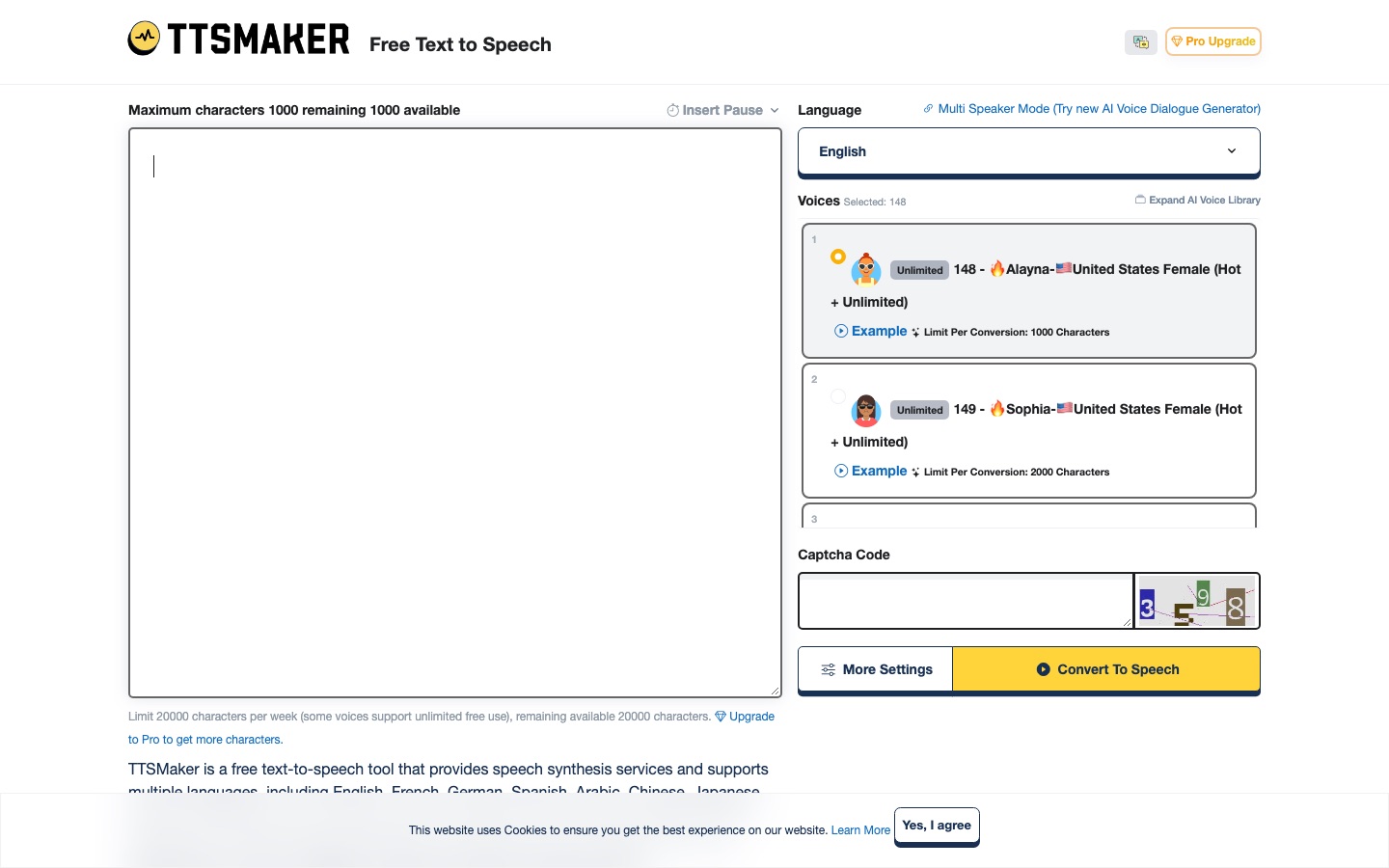
TTSMaker is an online text-to-speech tool that converts typed text into spoken audio using more than 600 AI voices across over 100 languages. TTSMaker is used by pasting text, picking a language and a voice, and converting; the result can be played in the browser or downloaded as MP3, WAV and other audio formats.
Best for Creators and educators who need quick voiceovers or read-aloud audio in many languages without installing software.
- Listed in
- Text to Speech
- Platforms
- Web, API
- Pricing model
- Freemium
- Free plan
- Yes
- API
- Yes
- Added
Last verified: . Information taken from ttsmaker.com.
What is TTSMaker?
TTSMaker is a browser-based text-to-speech service that reads typed or pasted text aloud and lets you download the result as an audio file. The free edition works without payment under a weekly allowance of 20,000 characters, while a group of voices marked as unlimited does not count against that allowance. Settings cover the output format (MP3, OGG, AAC, OPUS or WAV), speaking speed, volume, pitch, the gap between paragraphs and optional background music. Some voices offer emotional styles such as cheerful, sad or whispering, which are reserved for paying users. TTSMaker Pro, a separate paid studio, raises the character limits, removes the captcha and adverts, adds a multi-voice dialogue editor and, on its higher tiers, an API. The site states that generated audio may be used commercially.
Key Features
Large Voice Library
Offers 600+ AI voices in 100+ languages, including regional English accents and children's voices.
Audio Format Choice
Exports speech as MP3, OGG, AAC, OPUS or WAV, with standard and high quality settings for MP3.
Speed, Volume and Pitch
Changes the speaking rate between 0.5x and 2.0x, the loudness between 10% and 200%, and raises or lowers pitch.
Pause Control
Inserts timed breaks of up to ten seconds inside the text and sets how long the voice waits after each paragraph.
Emotion Styles
Lets certain voices speak in styles such as newscast, cheerful, angry or whispering; this setting belongs to the Pro product.
Dialogue Editor and API
Adds multi-speaker dialogue projects and programmatic access on the Pro Mini tier and above.
How TTSMaker works
Paste your text
Type or paste the words you want spoken into the editor.
Pick a language and voice
Choose the language of the text and one of the voices offered for it.
Convert
Start the conversion; longer passages take more time, and speed or volume can be changed under the extra settings.
Play or download
Listen to the result in the browser or save the audio file.
Use Cases
- Video Voiceovers
- Produce narration tracks for online videos without recording a voice.
- Listening to Long Texts
- Have articles or e-books read aloud instead of reading them on screen.
- Multilingual Narration
- Create the same script as audio in several languages using native-sounding voices.
- Subtitled Audio
- Export an SRT subtitle file that matches the generated speech.
- Scripted Conversations
- Build a dialogue between several voices for training material or stories.
Things to know
- Free files are temporary
- On the free tool, a generated audio file is removed automatically within 30 minutes, so it has to be downloaded promptly.
- Quotas do not roll over
- Paid character allowances reset on each billing date; extra character packs can be bought by subscribers.
- Pricing is per character
- Charges depend on characters converted, not on audio length, which varies with language, voice and speed.
- API needs a higher tier
- API keys are available to Pro and Studio subscribers, not to Lite.
FAQs
What is TTSMaker?
TTSMaker is an online text-to-speech tool that turns written text into audio using AI voices. It runs in the browser and offers both a free edition and a paid Pro studio.
What is TTSMaker used for?
TTSMaker is used for video voiceovers, for having text and e-books read aloud, and for producing downloadable narration in many languages.
Is TTSMaker free?
Yes. TTSMaker Free allows 20,000 characters per week, and some voices are marked as unlimited and do not use that quota. The free edition shows a captcha and adverts.
How much does TTSMaker cost?
The page presents these as limited-time deal prices.
Does TTSMaker have an API?
Yes. TTSMaker Pro offers an API for subscribers on the Pro and Studio tiers; the Lite plan does not include it. API calls use up the same character quota.
Which audio formats does TTSMaker support?
TTSMaker can output MP3, OGG, AAC, OPUS and WAV files. It can also export an SRT subtitle file for the generated audio.
Can I use TTSMaker audio commercially?
Yes. TTSMaker states that users hold commercial usage rights for the audio they generate, including use in online videos.
Who it's for
- Video creators
- Educators
- E-book readers
- Podcasters
- Developers
Used in these workflows
- Translation and localization, job by job: AI tools for documents, subtitles, dubbing and live speechStage 5: Voiceover in other languages
Each guide lists the stages of one job and the tools that help at each stage. All guides
Comments
No comments yet. If you have used TTSMaker, tell other readers how it went.
Alternatives to TTSMaker
| Tool | Free plan | Starting price | API |
|---|---|---|---|
 ListnrAI voice generator for text to speech, voice cloning and narration in a browser-based studio. ListnrAI voice generator for text to speech, voice cloning and narration in a browser-based studio. |
Yes | — | Yes |
 NaturalReaderAI text-to-speech apps that read documents, web pages and scanned books aloud and create voiceovers. NaturalReaderAI text-to-speech apps that read documents, web pages and scanned books aloud and create voiceovers. |
Yes | — | — |
 LazybirdAI voiceover generator that turns scripts into downloadable speech with 200+ voices, voice cloning and an API. LazybirdAI voiceover generator that turns scripts into downloadable speech with 200+ voices, voice cloning and an API. |
Yes | — | Yes |
 LuvvoiceOnline text-to-speech tool with more than 200 AI voices in over 70 languages and MP3 download. LuvvoiceOnline text-to-speech tool with more than 200 AI voices in over 70 languages and MP3 download. |
Yes | — | Yes |
 TypecastAI voice generator with emotion-aware text to speech, voice cloning, a mobile app and a developer API. TypecastAI voice generator with emotion-aware text to speech, voice cloning, a mobile app and a developer API. |
Yes | — | Yes |
Listed in the same category as TTSMaker. A starting price appears only where we checked it on the maker’s pricing page; a dash means not checked or not published. All Text to Speech tools