
AgentSkill.sh
Directory and marketplace of installable skills for AI coding agents such as Claude Code, Cursor and Copilot.
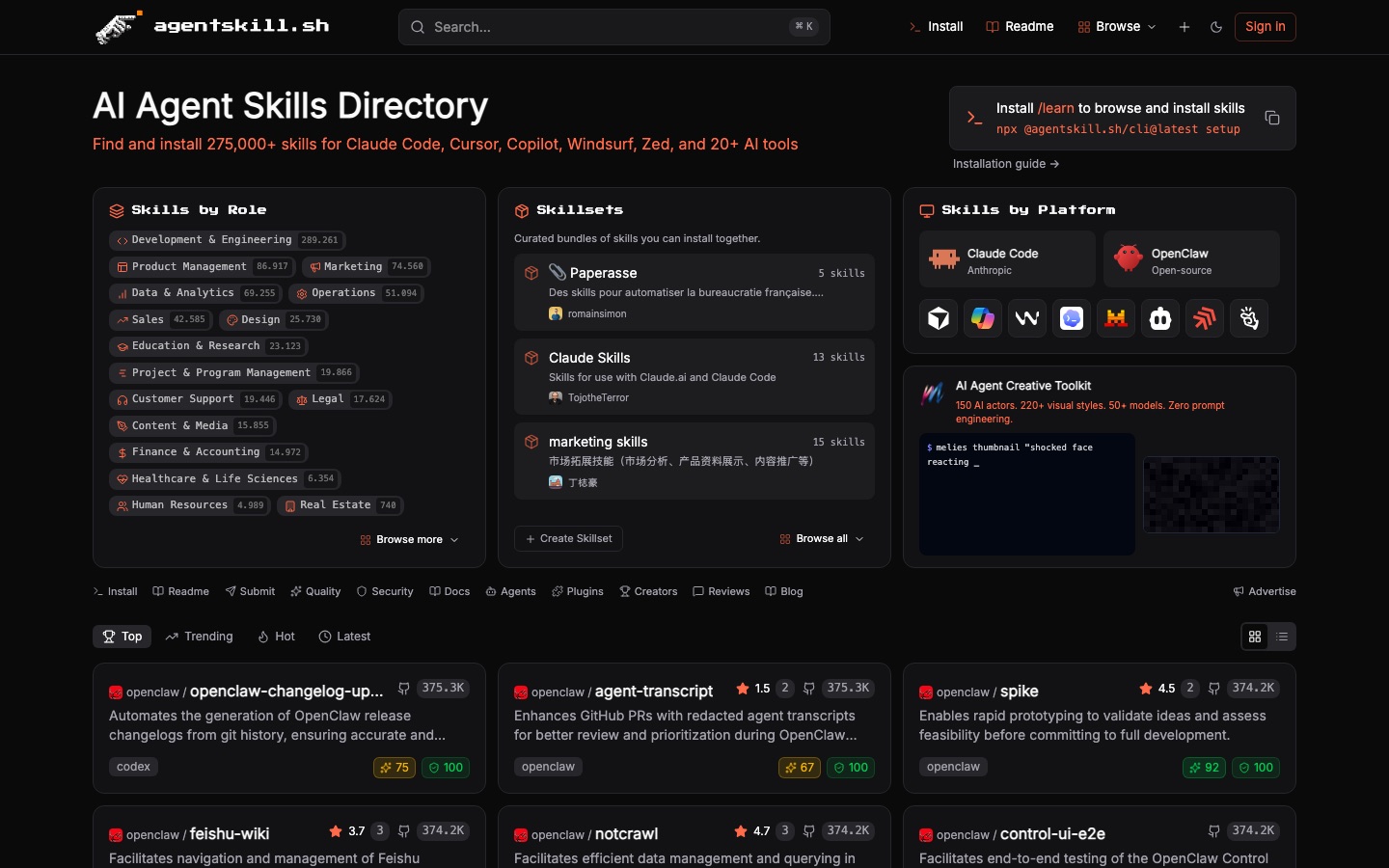
AgentSkill.sh is an online directory where people find and install skills for AI agents. AgentSkill.sh lists more than 275,000 skills for Cursor, Claude Code, Zed, Windsurf, Copilot and over twenty other tools, groups them by job role and platform, and attaches a quality score and a security audit to each listing.
Best for Developers and other knowledge workers who use an AI coding agent and want to add ready-made, reviewed skills instead of writing their own.
- Platforms
- Web
- Made by
- Yuki Capital
- Added
Last verified: . Information taken from agentskill.sh.
What is AgentSkill.sh?
AgentSkill.sh is a searchable directory and marketplace of skills, the reusable instruction packages that extend AI agents. The catalogue holds more than 275,000 entries and covers Claude Code, Cursor, GitHub Copilot, OpenAI Codex, Windsurf, Zed and over twenty further tools. Skills are organised by role, from engineering and product management to legal, finance and healthcare, and can also be browsed by platform or as curated bundles called skillsets. Every card shows a short description, the agents it targets, a quality score out of 100 with a written review, and a security score with the audit date and any issues found by severity. Installation is handled through a command-line tool, after which a slash command inside the agent lets you browse and add skills. The site is run by Yuki Capital.
Key Features
Large Skill Catalogue
Indexes over 275,000 skills and lets you search them or sort by top, trending, hot and latest.
Browsing by Role
Groups skills under sixteen professional areas, each showing how many skills it contains, with narrower sub-roles inside.
Quality Scores
Rates each skill out of 100 across discovery, implementation, structure and expertise, and links to the full review.
Security Audits
Displays a security score, the date of the audit and a count of low, medium or high findings for every skill.
Skillsets
Bundles related skills, curated by community members, so a whole set can be installed together.
Command-Line Install
Sets up through a single npx command and then exposes a /learn command for browsing and installing from inside the agent.
How AgentSkill.sh works
Run the setup command
Execute the npx command shown on the home page to install the command-line tool.
Open the skill browser
Type /learn in your agent to look through available skills.
Check the scores
Read the quality review and security audit attached to a skill.
Install
Add the chosen skill or an entire skillset to your agent.
Screenshots
Use Cases
- Extending a Coding Agent
- Add skills for testing, debugging, pull-request triage or changelog writing to Claude Code or Codex.
- Equipping Non-Engineering Roles
- Find skills written for marketing, sales, support, legal or finance work rather than software development.
- Vetting a Skill Before Use
- Read the security audit and quality review to see what a skill does before it runs in your environment.
- Rolling Out a Team Toolkit
- Assemble a skillset so colleagues can install the same group of skills in one step.
- Publishing Your Own Skill
- Submit a skill you wrote so other agent users can discover it in the directory.
Things to know
- Community-submitted content
- Skills and skillsets come from many different authors, and some listings are written in languages other than English.
- Audits can report open issues
- A listing may show medium or high severity findings, so the security panel is worth reading before installing.
- No pricing stated
- The home page does not describe any paid plan or fee for using the directory.
FAQs
What is AgentSkill.sh?
AgentSkill.sh is a directory and marketplace of skills for AI agents. It lists more than 275,000 skills that can be searched, reviewed and installed.
What is AgentSkill.sh used for?
AgentSkill.sh is used to find add-on skills for agents like Claude Code or Cursor and install them. It also lets authors submit skills and group them into bundles.
Which AI tools does AgentSkill.sh support?
AgentSkill.sh covers Claude Code, Cursor, GitHub Copilot, OpenAI Codex, Windsurf, Zed, Cline, JetBrains, Replit, Aider and others, more than twenty tools in total according to the site.
How do I install skills from AgentSkill.sh?
AgentSkill.sh is set up by running its npx command in a terminal. Once that is done, the /learn command is used to browse and install skills.
Does AgentSkill.sh check skills for security problems?
Yes. Each AgentSkill.sh listing carries a security score with an audit date and shows how many low, medium or high severity issues were detected.
Who makes AgentSkill.sh?
AgentSkill.sh is published by Yuki Capital, as stated in the site footer.
Can I submit my own skill to AgentSkill.sh?
Yes. AgentSkill.sh has a submit option and a section for creators, and users can also build their own skillsets.
Who it's for
- Developers
- Product managers
- Marketers
- Data analysts
- Skill authors
Comments
No comments yet. If you have used AgentSkill.sh, tell other readers how it went.
Alternatives to AgentSkill.sh
| Tool | Free plan | Starting price | API |
|---|---|---|---|
 skills.shDirectory and leaderboard of installable skills for AI coding agents, added with one CLI command. |
— | — | Yes |
 Command CodeTerminal coding agent tuned for open models that learns a developer's coding preferences from accepted and rejected edits. |
— | — | Yes |
 CursorAI coding agent and editor that plans, writes and reviews code on the desktop, in the terminal and in the cloud. |
Yes | — | — |
 FactoryAgent-native software development platform whose Droids plan, build, review and ship code across desktop, CLI and web. |
— | — | — |
 MulticaSource-available project management platform where AI coding agents are assigned issues like human teammates. |
— | — | Yes |
Listed in the same categories as AgentSkill.sh. A starting price appears only where we checked it on the maker’s pricing page; a dash means not checked or not published. All AI Agents & Automation tools