

Image prompt Branding & UI Customizable
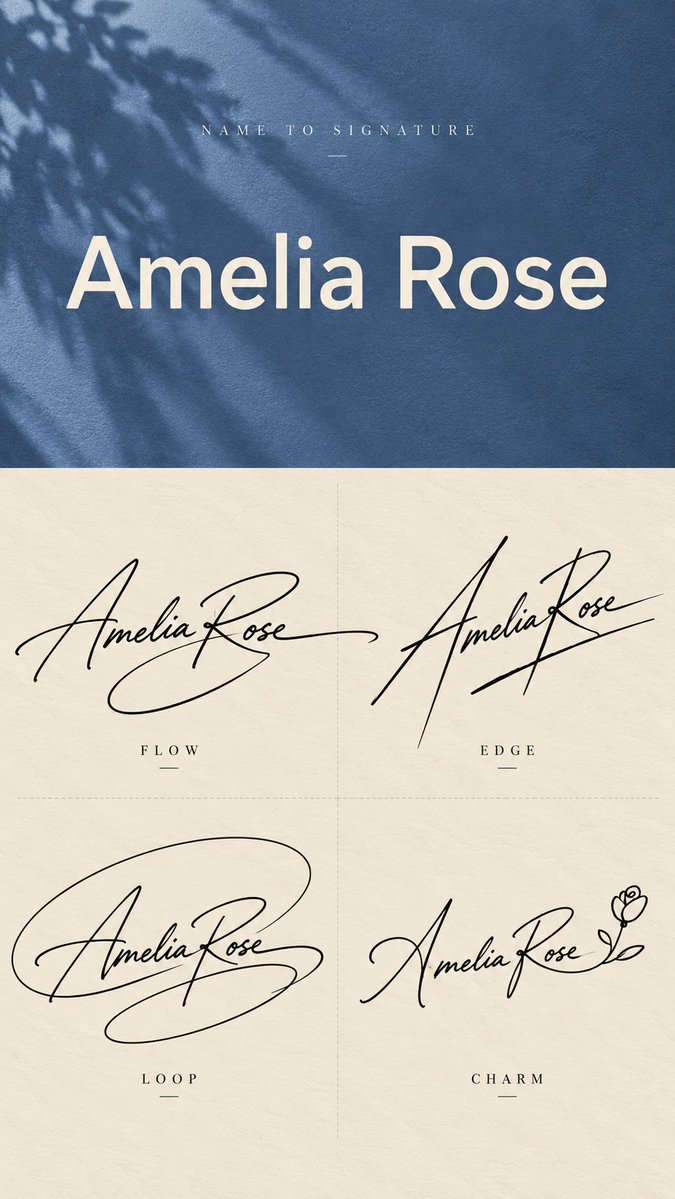
Name to Signature Design Sheet in Four Handwritten Styles
One typed name becomes four handwritten signatures in flowing, sharp, looping and minimal styles, laid out on a vertical sheet. Each one reads as a distinct personal mark rather than four versions of the same cursive.

- Model
- GPT Image 2
- Type
- 4 images
- Aspect ratio
- 9:16
- Shared
- 27 Sep 2026
- Likes on X
- 39
Image prompt
3,129 characters[Name]: {e.g. Amelia Rose} [Top Background Color]: {e.g. dusty blue, muted rose, forest green, deep burgundy, warm ochre} [Final Ratio]: 9:16 Create a vertical 9:16 "Name to Signature" design sheet that transforms one plain English name into four clearly different handwritten signature concepts. Use two sections. The top 40% shows the original typed name, and the bottom 60% shows four signature designs. For the top section, use the selected muted background color with subtle paper or fabric texture and a soft natural shadow. Add small widely spaced text at the top: NAME TO SIGNATURE Display the original name in the center using a large, clean neutral sans-serif font such as Helvetica, Arial, Inter, or a similar modern typeface. This must look like normal typed text, not handwriting. Keep the layout minimal and do not add extra slogans or decorative copy. For the bottom section, use a warm ivory paper background with very subtle grain. Divide it into a clean 2×2 grid using faint thin dashed lines, with no outer border. Create four large black handwritten signatures for the same name. They must be noticeably different in silhouette, rhythm, stroke direction, abstraction, and personality. Do not simply generate four similar cursive versions. Use realistic gel pen or fountain pen handwriting with natural pressure variation, lighter entry strokes, stronger main strokes, tapered endings, and slight ink irregularity. Letters may merge, stretch, overlap, simplify, share strokes, or become partially abstract. The goal is signature design, not perfect letter-by-letter readability. FLOW: Create a graceful, fluid signature with smooth connected strokes and one or two long sweeping tails. Keep it elegant, natural, and believable as a real personal signature. EDGE: Create a sharper, more directional signature using stronger slant, tall vertical accents, pointed turns, crossings, and decisive endings. Make it modern, confident, and fashion-forward. LOOP: Build the signature around a large expressive looping gesture. Compress parts of the name inside or across the loop, and allow one stroke to extend outward as a strong finishing motion. Keep the loop organic and handwritten rather than geometrically perfect. MARK: Create the most minimal and abstract version. Reduce the name to approximately 4–6 important strokes, often using the initials or strongest letter shapes as the foundation. The result may resemble a personal monogram or creator mark more than fully readable handwriting. For softer or more romantic names, MARK may be replaced with CHARM: a refined usable signature with one subtle personal detail, such as a tiny heart-like terminal or a minimal floral gesture. Keep it tasteful and mature. The four designs must feel clearly different at first glance. FLOW should feel fluid, EDGE sharp, LOOP expressive, and MARK minimal. Keep each signature large enough to dominate its quadrant. Do not add extra descriptions under the style labels. Do not add watermarks, numbering, decorative borders, stars, crowns, excessive hearts, unrelated icons, or unnecessary graphic elements.
How to use it
It was shared as a GPT Image 2 prompt. Swap the name in the first line and pick a background color that suits your brand, then keep the four style descriptions as written, since they carry the difference between the signatures. The sheet works well as a starting point for a personal logo, a creator mark, or a signature sample to test before you commit to a design.
Shared publicly on X on 27 Sep 2026. All credit for this prompt and its result goes to its creator. Is this yours? Ask for an update or removal.