
RemoveHandwriting
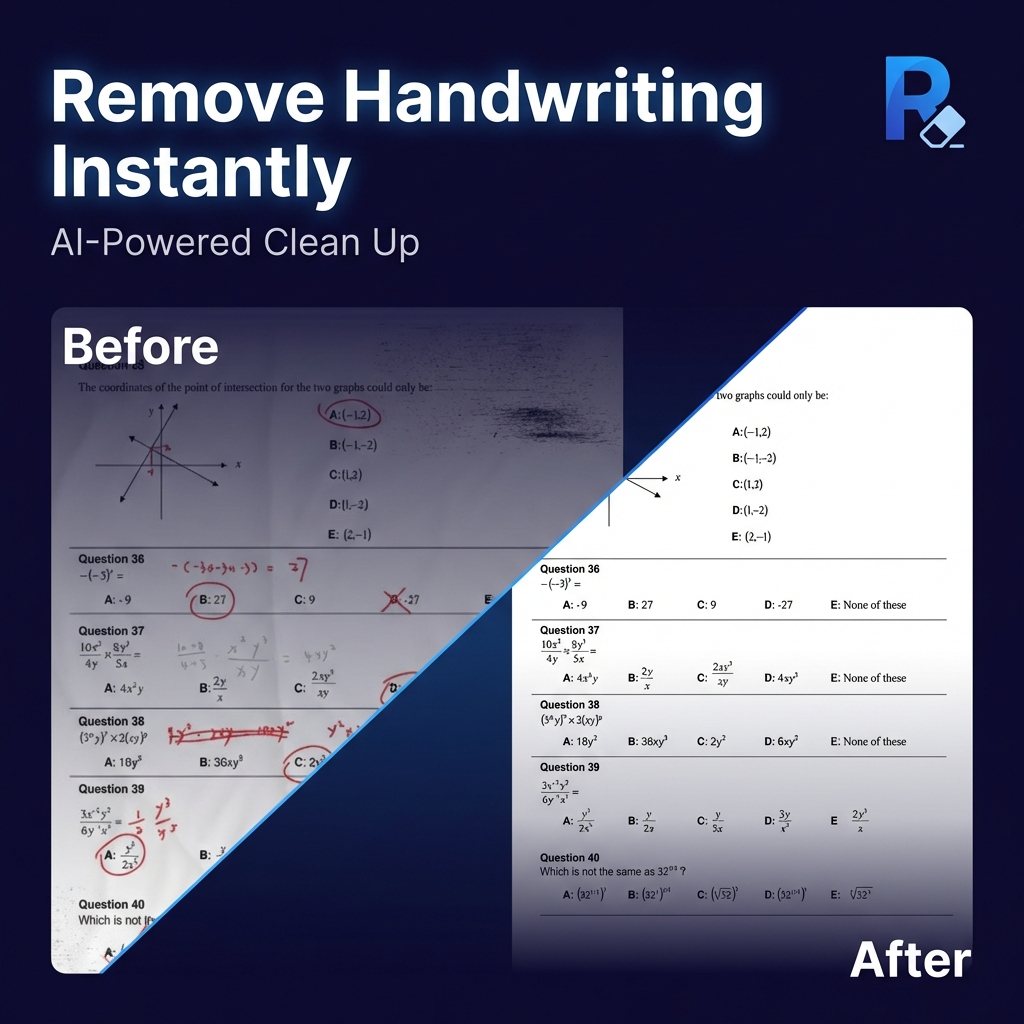
AI tool that erases handwritten notes, marks and signatures from images, scans and PDFs while keeping printed content.
RemoveHandwriting is an AI document cleanup service that strips handwritten answers, notes, pen marks and signatures from photos, scans and PDF pages. RemoveHandwriting is used to produce clean reusable copies of worksheets, forms and archives: you upload a file, pick a processing model, and download the cleaned result through the browser or the mobile app.
Best for Teachers, students, parents and office or records teams who need clean copies of marked-up worksheets, forms, contracts or archived scans.
- Platforms
- Web, iOS, Android, API
- Pricing model
- Subscription
- Starting price
- $3.90 per month Basic Monthly
- Free trial
- Yes
- API
- Yes
- Made by
- Shenzhen Liwa Software Technology Co., Ltd.
- Added
Last verified: . Information taken from removehandwriting.com.
What is RemoveHandwriting?
RemoveHandwriting is a web and mobile AI tool that removes handwriting from document images and PDF files. It targets handwritten answers, annotations, underlines, highlights, scribbles and signatures while aiming to leave printed text, tables and diagrams in place. Beyond erasing marks, it detects paper edges to crop away backgrounds, straightens skewed or curled pages, and reduces shadows and stains. Users choose between three models: Standard for quick scan-style black and white output, Color for keeping the original colors, and Ultra for harder pages. Processing is paid with credits, available through Basic and Pro subscriptions or one-time packs that do not expire. The service also offers bulk image processing, PDF page selection, a selected-area mode, a paid human cleanup option for difficult files, an API, and several free utilities such as PDF splitting and image compression.
Key Features
Three processing models
Standard gives fast scan-style output, Color keeps the original paper tones and highlights, and Ultra handles difficult pages with deeper removal, costing 1, 3 and 5 credits per image.
PDF page selection
Upload a PDF, choose only the pages that contain handwriting, and export the cleaned result as a new PDF.
Selected-area removal
Mark a specific note, answer or signature so only that handwriting is erased instead of cleaning the whole page; this mode uses the Ultra model.
Page geometry correction
Automatically finds document borders, crops out desks and scanner edges, and flattens skewed, warped or curled pages.
Batch processing
Process several images in one run through the bulk remover for larger cleanup jobs.
Expert manual cleanup
Send difficult images to the team for manual refinement, which usually takes around 12 hours.
How RemoveHandwriting works
Capture the document
Photograph or scan the page that contains handwriting.
Upload the file
Upload a JPG, JPEG, PNG image or a PDF to the website or app and choose a processing model.
Let the AI process it
Wait a few seconds while the AI detects and removes the handwritten marks.
Download the result
Save the cleaned image or PDF for printing, editing or archiving.
Use Cases
- Reusing practice worksheets
- A parent or tutor scans a completed math or spelling sheet, removes the answers, and prints a fresh copy for another round of practice.
- Preparing clean exam copies
- A teacher erases grading marks and student writing from test papers to produce a printable master copy.
- Archiving legacy paperwork
- A records team cleans scanned forms and historical documents with handwritten corrections before storing them.
- Circulating reviewed contracts
- A contracts administrator removes handwritten approval notes from scanned PDFs before sharing them internally.
- Sharing annotated readings
- A graduate student strips personal highlights and comments from a long PDF reading and sends a clean version to classmates.
Pricing
Basic Monthly
$3.90
per month, billed monthly
60 credits per month
- Access to Standard, Color and Ultra models
- Works on web and app
- Credit rollover while subscribed
Basic Quarterly
$10.90
per quarter, billed quarterly
180 credits per quarter
- Stated 7% saving versus monthly
- Credit rollover while subscribed
Basic Yearly
$39.90
per year, billed yearly
720 credits per year
- Stated 15% saving versus monthly
- Credit rollover while subscribed
Pro Monthly
$24.90
per month, billed monthly
700 credits per month
- Priority processing
- Higher credit allowance for frequent users
Pro Quarterly
$68.90
per quarter, billed quarterly
2100 credits per quarter
- Priority processing
- Stated 8% saving versus monthly
Pro Yearly
$239.90
per year, billed yearly
8400 credits per year
- Priority processing
- Stated 20% saving versus monthly
Starter Pack
$9.99
one-time, one-time payment
65 credits
- Credits never expire
- Suited to occasional use
Popular Pack
$18.99
one-time, one-time payment
130 credits
- Credits never expire
- Can be combined with subscription credits
Bulk Pack
$34.99
one-time, one-time payment
280 credits
- Credits never expire
- Lowest per-credit cost among packs
Credits are spent per image: Standard 1, Color 3, Ultra 5. Subscription credits roll over while active; one-time packs never expire. Checked 1 Nov 2026 at removehandwriting.com.
Things to know
- Free trial limits
- One Ultra image or one PDF page can be previewed free without signing in, and first registration adds 1 credit, but trial results cannot be downloaded or printed.
- Credit rules
- Unused subscription credits roll over while the subscription is active and expire at the end of the period after cancellation; one-time credit packs never expire.
- Refund window
- Eligible refund requests must be submitted within 3 days of purchase, subject to conditions.
- File handling
- Uploaded documents are deleted automatically after processing and are stated not to be used for training.
FAQs
What is RemoveHandwriting?
RemoveHandwriting is an AI tool that erases handwritten marks from images and PDFs while keeping printed text and layout. RemoveHandwriting also crops, straightens and cleans up scanned pages.
What file formats does RemoveHandwriting support?
RemoveHandwriting accepts JPG, JPEG and PNG images as well as PDF documents. PDFs can be processed page by page and exported as a new PDF.
Is RemoveHandwriting free?
RemoveHandwriting offers a free trial preview of one Ultra image, plus 1 credit on first registration, but trial results cannot be downloaded. Regular use requires a subscription starting at $3.9 per month or a one-time credit pack starting at $9.99.
How many credits does RemoveHandwriting use per image?
RemoveHandwriting charges 1 credit per image for Standard, 3 for Color and 5 for Ultra. Selected-area removal always uses Ultra at 5 credits.
Does RemoveHandwriting work on mobile?
Yes, RemoveHandwriting has apps for iOS and Android. One account and the same credits work on both the website and the apps.
Does RemoveHandwriting have an API?
Yes, RemoveHandwriting provides API access for larger or automated workflows.
Can I cancel a RemoveHandwriting subscription anytime?
Yes, RemoveHandwriting subscriptions can be canceled from the account page without contacting support. Plan benefits remain available until the current billing period ends.
Who makes RemoveHandwriting?
RemoveHandwriting is operated by Shenzhen Liwa Software Technology Co., Ltd.
Who it's for
- Teachers
- Students
- Parents
- Records managers and archivists
- Office administrators
- Small businesses
Comments
No comments yet. If you have used RemoveHandwriting, tell other readers how it went.
Alternatives to RemoveHandwriting
| Tool | Free plan | Starting price | API |
|---|---|---|---|
 TinyWowCollection of free browser-based tools for PDFs, images, video, files and AI writing, with an optional premium tier. |
Yes | — | — |
 AI Doc MakerAI generator that turns a prompt into formatted documents, PDFs, slides, spreadsheets and voiceovers. |
Yes | — | — |
 AI Exporter HubChrome extension that bulk exports chats from six AI assistants to Notion, Markdown, Obsidian or PDF with media kept intact. |
— | — | — |
 AI LawyerLegal AI assistant that answers legal questions in chat, summarises and compares documents, and drafts letters and clauses. |
— | — | — |
 AITranslator.comFree AI translator that compares the output of 22 AI models and returns the translation most of them agree on. |
Yes | — | Yes |
Listed in the same categories as RemoveHandwriting. A starting price appears only where we checked it on the maker’s pricing page; a dash means not checked or not published. All Image Editing tools