
FASHN AI
Fashion AI agent that creates on-model product photos, virtual try-ons and short videos for e-commerce brands.
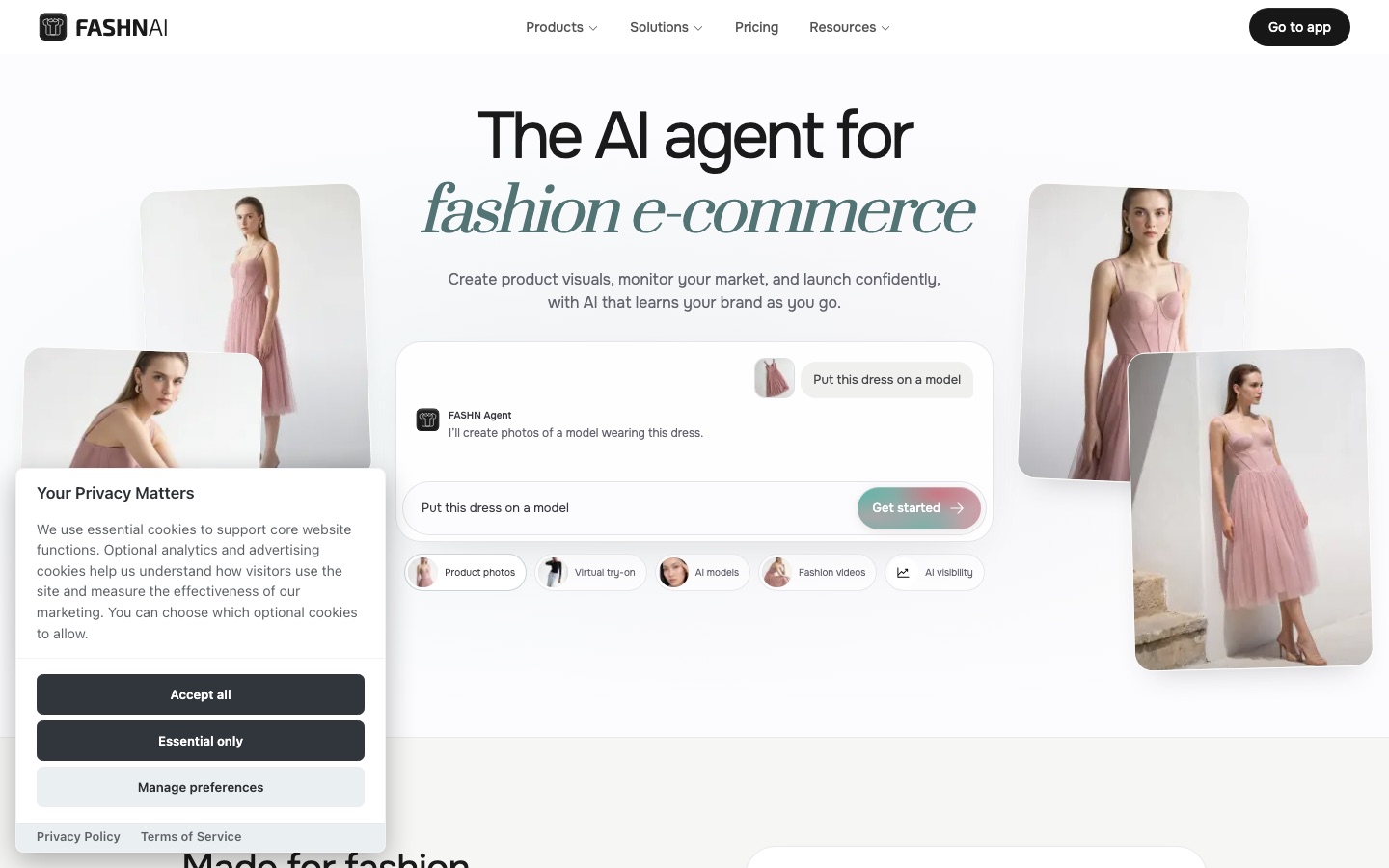
FASHN AI is a fashion-focused AI platform that generates on-model product photos, virtual try-on images and short videos for online stores. FASHN AI is used through a chat agent on the web or iOS, where a product photo and a short brief produce finished visuals, or through an API for custom integrations.
Best for Fashion brands and agencies that need on-model product imagery at volume without arranging a photoshoot for each item.
- Platforms
- Web, iOS, API
- Pricing model
- Subscription
- Free trial
- Yes
- API
- Yes
- Made by
- FASHN LTD
- Added
Last verified: . Information taken from fashn.ai.
What is FASHN AI?
FASHN AI is a platform for producing fashion imagery with AI, aimed at e-commerce brands and agencies. Its centre is the FASHN Agent, a chat interface where you supply a product photo, a model image or a written idea and describe the model, pose, styling and setting you want; the agent selects a suitable process and returns images. Tools include virtual try-on built on the company's own model, product-to-model shots, catalogue packshots, model swap, generated fashion models and short videos made from still images. A library called Elements holds ready-made models, poses and backgrounds, and the same model can be reused across looks. Teams share a workspace, credits, Collections and Labels. FASHN runs on the web and iOS with one account, and an API lets developers add try-on and generation to their own products. New accounts receive 10 credits.
Key Features
FASHN Agent
Takes a product photo and a plain-language brief, then chooses the process needed to create the image.
Virtual Try-On
Places a garment on a model using FASHN's proprietary try-on model.
Product to Model and Packshot
Converts product photos into on-model shots or catalogue-style packshots.
Consistent Models
Keeps one generated model identical across outfits, angles and campaigns.
Short Videos
Animates a finished image into a clip a few seconds long.
Developer API
Exposes image, try-on, editing and video tools for integration into other apps.
How FASHN AI works
Start with an asset
Bring a product photo, a model image, an item from the Elements library or just a written idea.
Describe what you want
Tell the agent the model, pose, styling, setting or edits; it picks the process.
Refine
Create variations, adjust details and explore other angles.
Add motion
Turn the images you like into short videos.
Screenshots
Use Cases
- Virtual Photoshoots
- Produce campaign and product imagery for a new collection without a studio session.
- Virtual Fitting Rooms
- Offer shoppers an interactive try-on inside an online store.
- Agency Campaigns
- Deliver visuals adapted to several markets for client brands.
- Catalogue Packshots
- Generate clean product shots for listings at volume.
- Model Swap
- Replace only the model in an existing photo while keeping the garment.
Things to know
- Check outputs against the product
- The FAQ notes that AI can get small details wrong and advises comparing each image with the real item before publishing.
- No AI label is added
- FASHN does not apply a visible watermark or label, and disclosure rules vary by country and marketplace.
- Real people need consent
- Uploading a photo of a real person requires their permission under the terms.
- No refunds
- Subscriptions and top-ups are non-refundable; unused monthly credits roll over up to a cap set by the plan.
FAQs
What is FASHN AI?
FASHN AI is a fashion-focused AI platform that generates on-model product photos, virtual try-on images, packshots and short videos.
What is FASHN AI used for?
FASHN AI is used by fashion brands and agencies to create product visuals for e-commerce, and by developers to add virtual try-on to their own apps.
How much does FASHN AI cost?
FASHN AI: a free trial is offered. Paid plan rates are published on fashn.ai. Check the official pricing page for current amounts.
Is FASHN AI free?
FASHN AI gives every new account 10 complimentary credits to try the tools. Continued use requires a paid plan or credit top-ups.
Does FASHN AI have an API?
Yes. FASHN AI offers a developer API with its own pricing for integrating try-on, image generation, editing and video.
Does FASHN AI work on mobile?
Yes. FASHN AI has an iOS app, and the subscription and credits are shared between it and the web app.
Who owns images made with FASHN AI?
FASHN AI's FAQ says you own your images to the extent the law allows and that commercial use is permitted within the terms of your plan. It adds that similar outputs can be generated for other users.
Does FASHN AI train on my uploads?
No, not by default. FASHN AI says uploads and generated images are not used to train or improve AI models unless you opt in through a separate agreement.
Who it's for
- Fashion brands
- E-commerce teams
- Marketing agencies
- Developers
- Creative teams
Comments
No comments yet. If you have used FASHN AI, tell other readers how it went.
Alternatives to FASHN AI
| Tool | Free plan | Starting price | API |
|---|---|---|---|
 Uwear.aiAI fashion model generator that turns flat lays and packshots into on-model photos and videos, via Studio, API or MCP. |
No | $0.10 | Yes |
 CaimeraAI visual production platform for fashion brands, turning flat-lays and sketches into on-model images, videos and tech packs. |
Yes | — | Yes |
 The New Black AIFashion AI platform for designing clothing, generating on-model product photos and videos, and running a Shopify store. |
— | — | Yes |
 WeShop AIAI image and video studio for online sellers, with virtual try-on, AI fashion models and product photography. |
— | — | Yes |
bitStudioAI fashion photo studio that turns flat lays and product photos into on-model images and short videos. |
Yes | — | Yes |
Listed in the same categories as FASHN AI. A starting price appears only where we checked it on the maker’s pricing page; a dash means not checked or not published. All AI Image Generator tools