Image prompt Branding & UI Customizable
Designer at Work Magazine Cover Photo Prompt
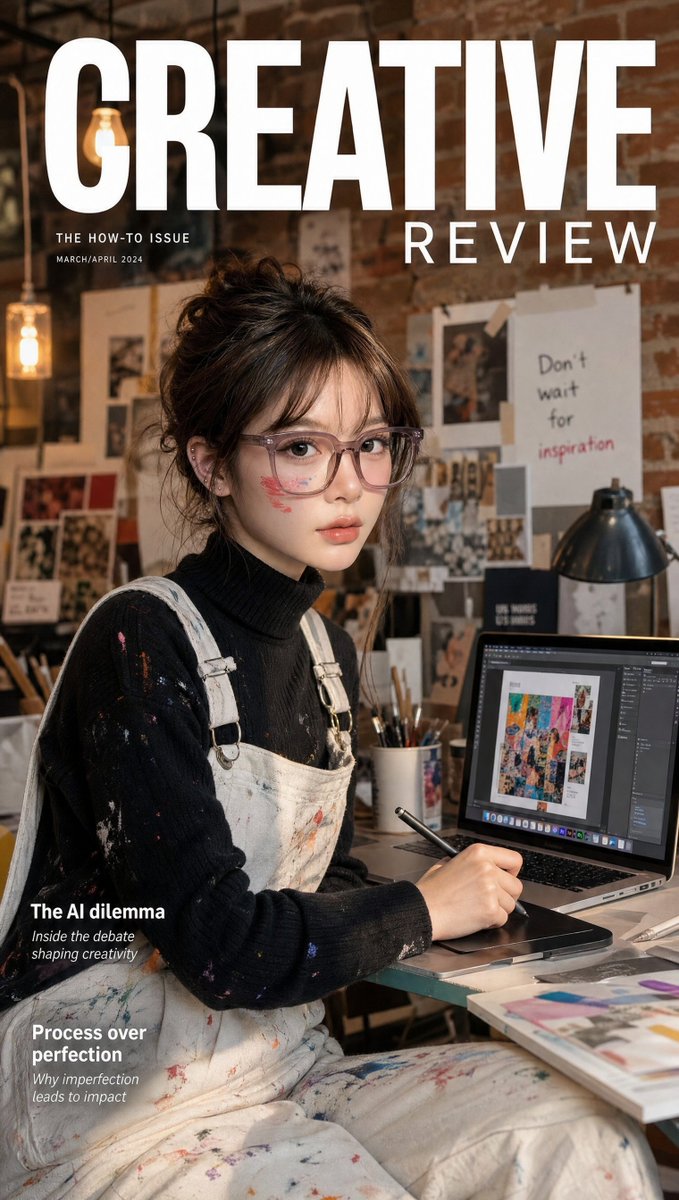
A photorealistic magazine cover of a designer at a laptop in a warm brick loft, with a stylus, graphic tablet and paint-spattered overalls. The glow of the screen and the studio clutter make it feel like a real editorial shoot.

- Model
- GPT Image 2
- Type
- Image
- Aspect ratio
- 9:16
- Shared
- 27 Jul 2026
- Likes on X
- 38
PersonMasthead textSoftware on screen
Image prompt
745 charactersUltra-realistic creative industry magazine cover featuring a talented Korean woman in paint-splattered white overalls over a black turtleneck, sitting at a MacBook Pro with Adobe Photoshop open on the screen mid-creative project, stylus in hand working on a graphic tablet, surrounded by art supplies and mood boards. Creative glowing skin, artistic makeup with a paint smear accent, hair in a relaxed messy bun. Background: warm creative studio loft – brick walls, pendant Edison bulbs, art prints pinned on walls, shallow depth of field. "CREATIVE REVIEW" masthead in bold editorial sans-serif. 35mm lens, ultra-detailed MacBook screen glow and studio texture, 8K photorealistic. Negative: cartoon, blurry, dark screen, watermark, distorted.
How to use it
Start with a photo of yourself or a model if you want the face to match, since the look depends on a real person. It was shared as a GPT Image 2 prompt. Keep the editorial framing, the warm loft lighting and the shallow depth of field, because those details carry the magazine feel. Swap the masthead text, the software on screen and the person to make it your own, then use the 9:16 result as a portrait-style cover or a social story.
Shared publicly on X on 27 Jul 2026. All credit for this prompt and its result goes to its creator. Is this yours? Ask for an update or removal.