Image prompt Branding & UI Customizable
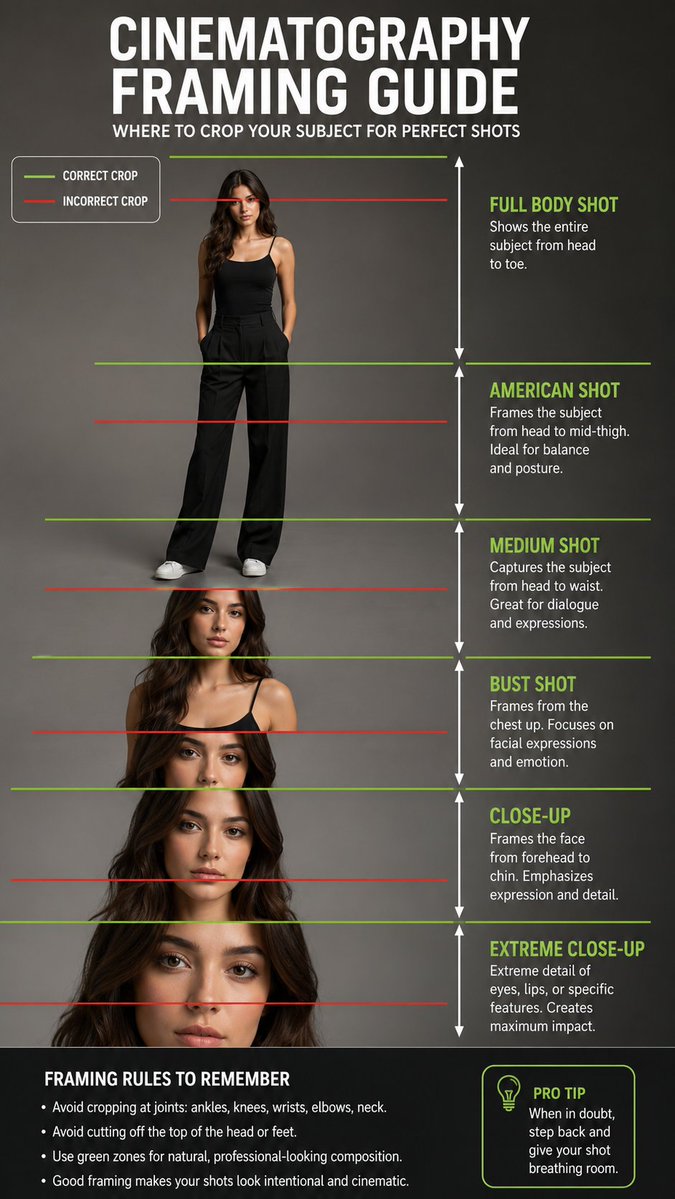
Cinematography Shot Size Framing Chart
A clean reference chart that lays out shot sizes from full body down to extreme close-up on one figure. Green and red guide lines mark where to crop correctly and where to avoid it, so the framing rules read at a glance.

- Model
- GPT Image 2
- Type
- Image
- Aspect ratio
- 9:16
- Shared
- 24 Jun 2026
- Likes on X
- 71
PersonSettingBackground color
Image prompt
892 charactersCreate a professional educational cinematography framing guide featuring a full-body female model standing in a clean studio environment. Show multiple camera shot sizes from full body to extreme close up. Add green horizontal guide lines for correct crop points and red horizontal guide lines for incorrect crop points. Include clear labels for Full Body Shot, American Shot, Medium Shot, Bust Shot, Close Up, and Extreme Close-Up. Add white vertical arrows showing the height range of each shot type. The design should look like a professional photography and filmmaking reference chart, with clean typography, realistic human proportions, soft studio lighting, and a neutral gray background. Negative Prompt: blurry text, distorted anatomy, extra limbs, bad proportions, unreadable labels, messy layout, harsh shadows, low resolution, cropped feet, cropped head, watermark, cartoon style.
How to use it
The prompt describes a full-body female model in a studio, so it works best with a model or figure in the same pose and a neutral backdrop. It was shared as a GPT Image 2 prompt. Swap the model description for a different subject to fit your own course or client, but keep the list of shot labels and the green and red line instruction so the chart still teaches the rules. Use the finished image as a teaching handout or a social carousel slide.
Shared publicly on X on 24 Jun 2026. All credit for this prompt and its result goes to its creator. Is this yours? Ask for an update or removal.