
Xiaoyi
Huawei's AI assistant for question answering, writing, document reading, coding help and image recognition.
Xiaoyi (小艺) is an AI assistant developed by Huawei. Xiaoyi answers questions, drafts text, reads uploaded documents, helps with code including HarmonyOS development, and recognises images. Xiaoyi is used through a Chinese-language chat page at xiaoyi.huawei.com, where you type a request or drop in files; a mobile version and a desktop workspace are also offered.
Best for Chinese-speaking users and HarmonyOS developers who want a general assistant from Huawei for questions, documents, writing and code.
- Listed in
- AI ChatbotsAI Code Assistant
- Platforms
- Web
- Made by
- Huawei
- Added
Last verified: . Information taken from xiaoyi.huawei.com.
What is Xiaoyi?
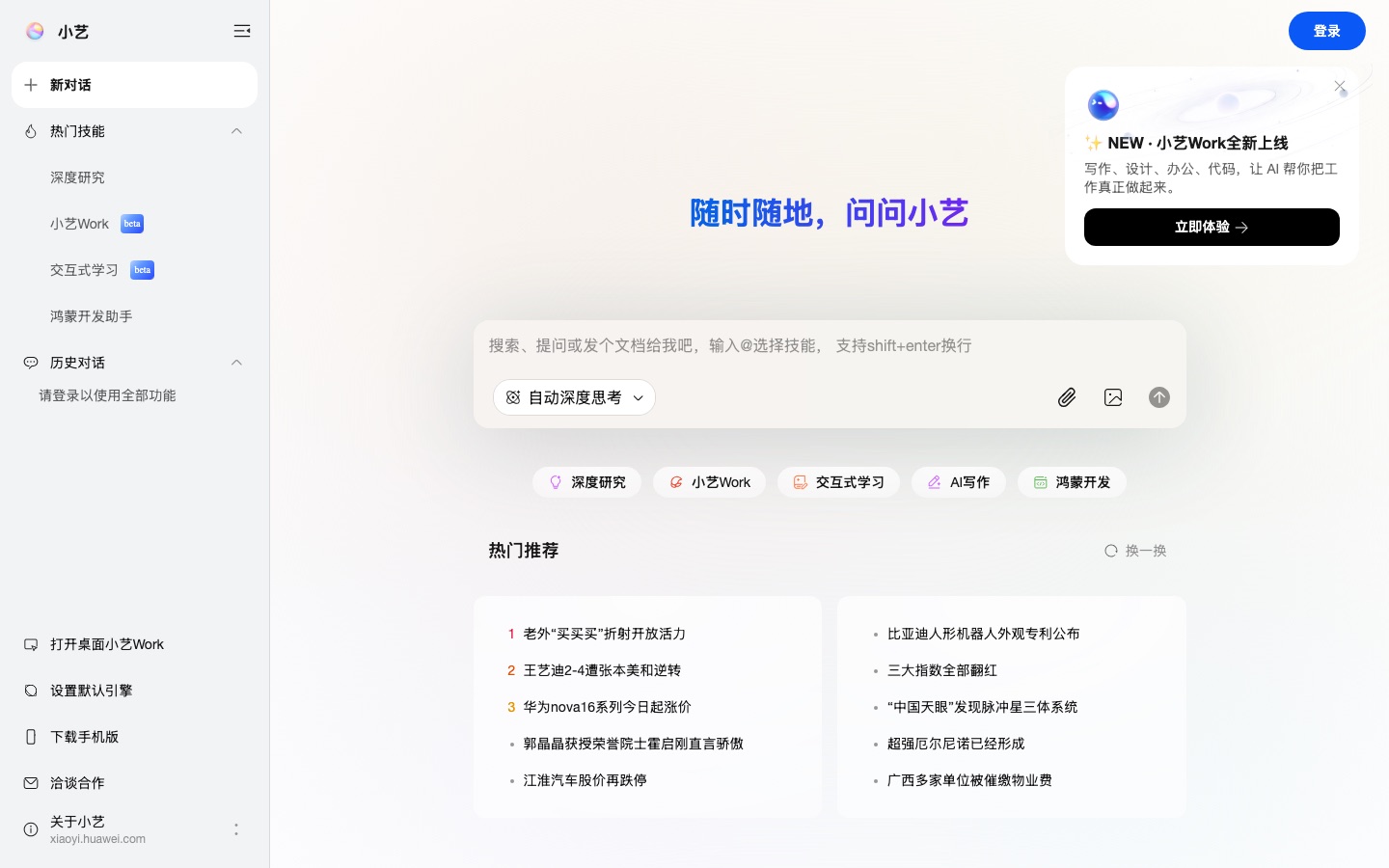
Xiaoyi (小艺) is an AI assistant developed in-house by Huawei and offered on the web at xiaoyi.huawei.com, with an interface in Chinese. The site describes a set of functions built on current AI technology: answering knowledge questions, writing, reading and working with documents, helping with code, generating and explaining HarmonyOS code, and recognising the contents of images. The chat page lets you type a question or drop in files, and it offers an automatic deep-thinking setting alongside shortcuts for deep research, interactive learning, AI writing and a HarmonyOS development helper. A newer area named Xiaoyi Work, marked as beta, is aimed at writing, design, office and coding tasks and can also be opened as a desktop application. A mobile version is available for download, and some functions require signing in.
Key Features
Knowledge Q&A
Answers questions typed into the chat box, with an option that switches deep thinking on automatically.
Document Reading
Accepts uploaded files, as many as 50 at once, in PDF, TXT, HTML, Word, Excel and PowerPoint formats.
Deep Research
Provides a dedicated research skill that can be started from the sidebar or below the input field.
AI Writing
Includes a writing mode for drafting text from a short request.
HarmonyOS Development Helper
Generates HarmonyOS code and answers questions about developing for that platform.
Xiaoyi Work
A beta workspace for writing, design, office and code tasks, available in the browser and as a desktop app.
Use Cases
- Summarising a Batch of Files
- Upload reports, spreadsheets and slides together and ask questions about their contents.
- Drafting Chinese-Language Text
- Use the writing mode to produce a first version of an article or message.
- Researching a Topic in Depth
- Run the deep research skill when a question needs a longer, structured answer.
- Building HarmonyOS Apps
- Ask for code samples or explanations while developing for Huawei's operating system.
- Studying Interactively
- Open the interactive learning skill to work through a subject step by step.
Things to know
- Chinese-language interface
- The website, its skills menu and its suggested topics are all shown in Chinese.
- Login for full access
- The page states that signing in is required to use every function.
- Upload limits
- A single upload can hold up to 50 files, restricted to PDF, plain text, HTML and Microsoft Office formats.
- Xiaoyi Work is in beta
- The work-focused area for writing, design, office and code tasks carries a beta label on the site.
FAQs
What is Xiaoyi?
Xiaoyi (小艺) is an AI assistant developed by Huawei that answers questions, writes text, reads documents, helps with code and recognises images.
Who makes Xiaoyi?
Xiaoyi is made by Huawei, which describes it as an AI assistant developed by the company itself.
What language is Xiaoyi in?
The Xiaoyi website at xiaoyi.huawei.com is presented in Chinese, including its menus and suggested topics.
Which file types can Xiaoyi read?
Xiaoyi accepts PDF, plain text and HTML files as well as Word (DOC, DOCX), Excel (XLS, XLSX) and PowerPoint (PPT, PPTX) documents, with up to 50 files per upload.
Does Xiaoyi work on mobile and desktop?
Yes. The Xiaoyi site links to a downloadable mobile version and to a desktop version of Xiaoyi Work, in addition to the web page.
Do I need an account to use Xiaoyi?
The Xiaoyi web page asks visitors to log in in order to use all of its functions.
Who it's for
- Huawei device users
- Chinese-speaking users
- HarmonyOS developers
- Students
- Office workers
Comments
No comments yet. If you have used Xiaoyi, tell other readers how it went.
Alternatives to Xiaoyi
| Tool | Free plan | Starting price | API |
|---|---|---|---|
ChatGPTAI chat assistant that answers questions, writes, creates images, runs deep research and helps with code. |
Yes | — | — |
 AI2SQLAI SQL assistant that writes, explains, fixes and optimises queries against your real database schema. |
Yes | $9/mo | Yes |
 AIPRMPrompt management tool and community prompt library that adds ready-made prompt templates to ChatGPT and Claude. |
Yes | — | — |
 Abacus.AIAI assistant platform that puts 100+ models in one chat app and adds agents that build apps, decks and reports. |
— | — | Yes |
 AbbyAI mental health companion that remembers your story, asks reflective questions and offers free therapist matching. |
— | — | — |
Listed in the same categories as Xiaoyi. A starting price appears only where we checked it on the maker’s pricing page; a dash means not checked or not published. All AI Chatbots tools