
Videnly
Generates AI videos from text ideas and posts them on a schedule to YouTube, TikTok, Instagram and other social channels.
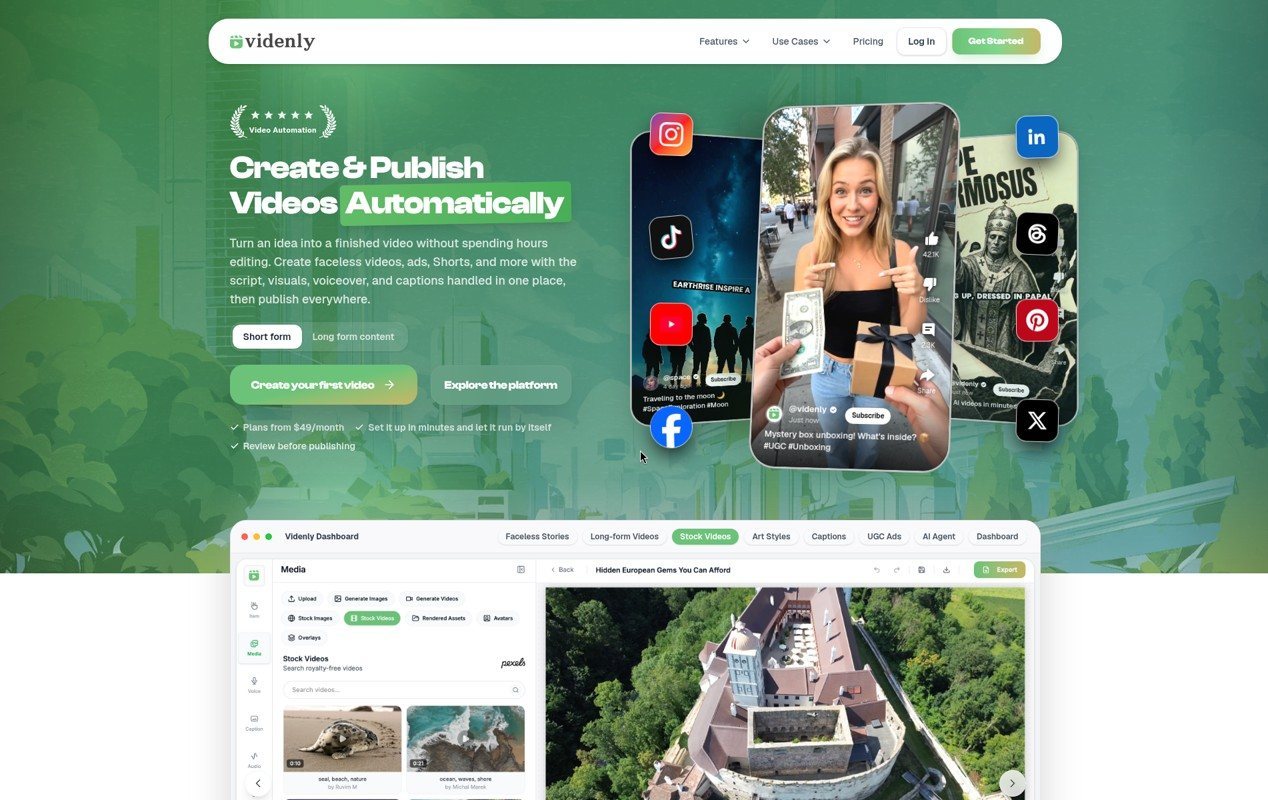
Videnly is an automated video generation platform that turns text ideas into finished videos with script, visuals, voiceover and captions, then schedules and posts them to connected social channels. Users review and edit each result in a built-in editor and organize work in projects using a monthly credit balance.
Best for Creators, marketing teams and agencies that want to produce and publish faceless videos, short stories, long-form YouTube content or ads at a steady pace without a production crew.
- Platforms
- Web, API, MCP
- Pricing model
- Subscription
- API
- Yes
- Made by
- Videnly
- Added
Last verified: . Information taken from videnly.com.
What is Videnly?
Videnly is a subscription-based AI video platform that combines video generation, editing, scheduling, publishing and analytics in one account. A user starts from a text prompt, article or idea, and the system assembles scenes, visuals, narration, music and captions. The result can be adjusted in a timeline editor, with an AI copilot available for edits, before it is downloaded or sent to connected accounts. Videnly supports short vertical clips, long-form videos, ads in a user-generated style and clips cut from longer footage. Work is grouped into projects per brand, client or channel, and a content calendar shows what is scheduled or already live. Supported image and video models run on Videnly credits, so no separate provider accounts or API keys are needed.
Key Features
Prompt-to-video generation
Converts a text prompt, article or story idea into a full video with scenes, visuals, narration and captions, in vertical, horizontal or square formats.
Built-in editor with AI copilot
Lets users adjust scenes, timing, media, overlays, captions and audio, and ask an AI copilot to make timeline changes before export.
Reusable art styles and characters
Users can describe a look or upload up to three reference images to save a style, and pick up to two saved characters to keep a consistent cast across scenes.
Scheduling and multi-platform publishing
Connects to YouTube, TikTok, Instagram and Facebook, with Pinterest, LinkedIn, Threads and X on higher plans, and posts videos on a weekly schedule or in bulk from exports.
Smart clipping of long videos
Splits a longer video into several short, editable clips for repurposing across social channels.
Projects, calendar and analytics
Organizes content by brand, client or channel, shows upcoming and published videos in a calendar, and tracks publishing status and performance across accounts.
How Videnly works
Start from an idea
Enter a prompt, topic, article or story idea and choose a workflow, style, voice and format; Videnly shows the estimated credit cost before generating.
Review and edit
Check the generated scenes, captions, media, timing and audio in the editor, making changes by hand or with the AI copilot.
Publish or schedule
Download the finished video, post it right away, or schedule it to the connected channels, then follow results in the dashboard.
Use Cases
- Faceless YouTube channels
- A creator turns niche topics such as history or motivational stories into videos and posts them to a channel on a regular timetable.
- Long-form business videos
- A company converts articles, webinars or reports into branded explainer videos of ten minutes or more, with matching thumbnails.
- E-commerce product ads
- An online store produces product videos and user-generated-style ads, including avatar presenters, for social campaigns.
- Agency video production
- An agency manages several client brands in separate projects and schedules finished videos to each client's connected accounts.
- Repurposing existing footage
- A marketing team cuts a long recording into short clips and distributes them across TikTok, Instagram and YouTube Shorts.
Things to know
- Credits reset monthly
- Each plan includes a monthly credit balance that is used across the AI tools; unused credits do not roll over, and cost varies by model and workflow.
- Platform access depends on plan
- All paid plans publish to YouTube, TikTok, Instagram and Facebook, while Pinterest, LinkedIn, Threads and X require Premium or above.
- Commercial use has conditions
- Videos may be used for business content, client work, ads and monetized channels, subject to Videnly's terms and the rules of each publishing platform.
- Plan changes
- Users can upgrade, downgrade or cancel from account settings with no cancellation fee and keep access until the current billing period ends.
FAQs
What is Videnly?
Videnly is an AI video generation platform that creates videos from text ideas and publishes them automatically to connected social media accounts. It also includes an editor, a content calendar and analytics.
What is Videnly used for?
Videnly is used to produce faceless videos, short stories, long-form YouTube videos, ads and clips from longer footage. Users then schedule and post the results to their channels.
Which platforms can Videnly publish to?
Videnly publishes to YouTube, TikTok, Instagram and Facebook on all paid plans. Pinterest, LinkedIn, Threads and X are available on Premium and above.
Can I review a video before Videnly publishes it?
Yes, Videnly lets you edit scenes, captions, media, timing and audio first. You then choose whether to download, publish immediately or schedule the video.
How do Videnly credits work?
Videnly plans include a monthly credit balance used across its AI creation tools. The cost is shown before each generation, the remaining balance is tracked in the dashboard, and credits do not roll over.
Does Videnly have an API?
Yes, Videnly offers API access for building custom video generation and publishing workflows. It also integrates with Zapier and can connect to compatible MCP clients.
Can I use Videnly videos commercially?
Yes, Videnly videos can be used for business content, client work, advertisements and monetized social channels. This is subject to Videnly's terms of service and the policies of each platform.
Do I need separate AI model subscriptions with Videnly?
No, Videnly gives access to supported image and video models through its own credits. No separate provider billing or API keys are required.
Who it's for
- content creators
- YouTube creators
- marketing teams
- agencies
- e-commerce brands
- solo founders
Comments
No comments yet. If you have used Videnly, tell other readers how it went.
Alternatives to Videnly
| Tool | Free plan | Starting price | API |
|---|---|---|---|
 VsubAI video maker that turns a script or voiceover into an illustrated faceless video in a reusable visual template. |
— | — | Yes |
 CrayoWeb-based AI editor for short-form video with auto clipping, voiceovers, subtitles and story video generators. |
— | — | Yes |
 invideoOnline video editor in which AI agents log footage, apply edits from plain-language directions and generate clips. |
— | — | — |
 AlgrowYouTube research and creation tool for finding niches and outlier channels and producing faceless videos with AI. |
— | — | Yes |
 AutoShorts.aiGenerates faceless short videos in a chosen niche and posts them to TikTok and YouTube on a schedule. |
— | — | — |
Listed in the same categories as Videnly. A starting price appears only where we checked it on the maker’s pricing page; a dash means not checked or not published. All AI Video Generator tools