SQLAI.ai
AI SQL toolbox that generates, optimizes, validates, explains, formats and converts queries across 30+ database engines.
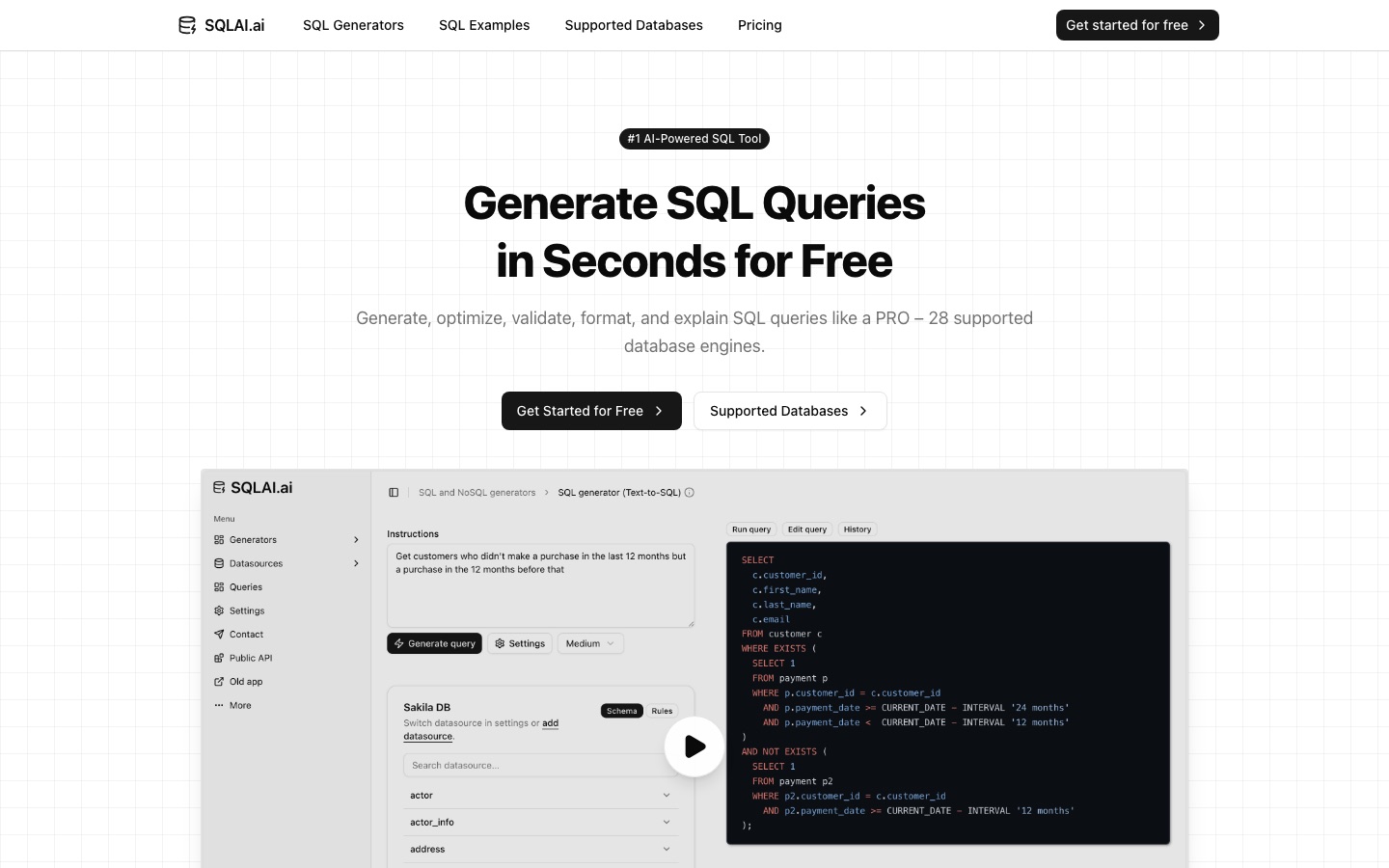
SQLAI.ai is an AI tool that writes SQL and NoSQL queries from plain-language requests and can also optimise, validate, explain, format and convert existing queries. SQLAI.ai is used in the browser by describing the data you need, optionally adding a database schema or a live connection so the generated query matches your tables.
Best for Analysts, developers and database administrators who write queries for several database engines and want schema-aware generation and review.
- Platforms
- Web, API
- Pricing model
- Subscription
- Free trial
- Yes
- API
- Yes
- Made by
- SQLAI.ai
- Added
Last verified: . Information taken from sqlai.ai.
What is SQLAI.ai?
SQLAI.ai is a set of AI generators for writing and maintaining SQL and NoSQL queries. Its text-to-SQL tool turns a request written in everyday language into a query, and companion tools speed up slow statements, check syntax and propose fixes, explain what each clause does, tidy formatting and translate a query from one engine's dialect to another. Accuracy can be raised by importing a schema or connecting a database directly, by setting per-database rules such as row limits, and by using autosuggest for table and column names while typing a prompt. Connected databases can also be queried in plain language. A diff view shows what the AI changed, and a code editor allows manual edits. Supported engines include MySQL, PostgreSQL, SQL Server, Oracle, Snowflake, BigQuery, MongoDB and Neo4j. Paid plans are sold by monthly query quota, and a public API is offered.
Key Features
Text-to-SQL Generator
Writes SQL or NoSQL from a natural-language description, ranging from basic selects to joins and aggregations.
SQL Optimizer
Rewrites slow queries with index-aware changes and states the reasoning behind each modification.
SQL Validator
Flags syntax problems in a query and suggests corrected versions with an explanation of the error.
Explainer and Formatter
Breaks a query down clause by clause in plain words and reformats it into a consistent style.
SQL Converter
Translates a query written for one database engine into the dialect of another.
Schema-Aware Datasources
Imports a schema or connects to a live database, including ones with 900+ tables, so output uses real table and column names.
Use Cases
- Self-Serve Data Questions
- Ask a connected database a question in plain language instead of waiting for the data team.
- Reviewing Slow Queries
- Paste a heavy join, compare the suggested rewrite in the diff view and decide what to keep.
- Migrating Between Engines
- Convert existing queries when moving a workload from one database system to another.
- Learning SQL
- Read step-by-step explanations of unfamiliar queries while studying or debugging.
- Documenting Report Logic
- Format and explain the queries behind dashboards so colleagues can follow them.
Things to know
- Some tools count double
- The pricing screen notes that each SQL Optimizer or SQL Validator generation uses two queries from the monthly quota.
- Read-only connections advised
- For querying live data, the site recommends connecting with read-only credentials as a security measure.
- Larger quotas sold separately
- XL plans for teams and API users with higher quotas are mentioned in the pricing FAQ.
FAQs
What is SQLAI.ai?
SQLAI.ai is an AI-powered toolbox for SQL and NoSQL work. It generates queries from text and also optimises, validates, explains, formats and converts them.
Which databases does SQLAI.ai support?
SQLAI.ai lists around 30 engines, including MySQL, PostgreSQL, SQL Server, Oracle, SQLite, Snowflake, BigQuery, Redshift, MongoDB, DynamoDB and Neo4j. Some allow a live connection while others work from an imported schema only.
Does SQLAI.ai have an API?
Yes. SQLAI.ai offers a public API; its FAQ says API requests are charged 3 credits per query, or 5 when the database schema is very large.
Is there a free trial of SQLAI.ai?
Yes. The SQLAI.ai pricing screen offers a 7-day free trial on its plans, and subscriptions can be cancelled at any time.
How much does SQLAI.ai cost?
SQLAI.ai sells Hobby, Starter, Explorer and Pro plans that differ in monthly query quota, with monthly or yearly billing. See the official pricing page for current prices.
Can SQLAI.ai handle large database schemas?
Yes. SQLAI.ai says it works with big schemas, whether imported or reached over a live connection, including databases of more than 900 tables, without running out of AI context.
Who uses SQLAI.ai?
SQLAI.ai names students, beginners and experienced professionals such as data analysts, developers and consultants as its users.
Who it's for
- Data analysts
- Developers
- Database administrators
- BI teams
- Students
Used in these workflows
- From raw data to a finished report: what AI does at each step, and what you still checkStage 3: Cleaning and preparing
Each guide lists the stages of one job and the tools that help at each stage. All guides
Comments
No comments yet. If you have used SQLAI.ai, tell other readers how it went.
Alternatives to SQLAI.ai
| Tool | Free plan | Starting price | API |
|---|---|---|---|
 Vanna AIOpen-source SQL agent framework that lets users query company databases in natural language. Vanna AIOpen-source SQL agent framework that lets users query company databases in natural language. |
— | — | Yes |
 AI2SQLAI SQL assistant that writes, explains, fixes and optimises queries against your real database schema. AI2SQLAI SQL assistant that writes, explains, fixes and optimises queries against your real database schema. |
Yes | $9/mo | Yes |
 GPTExcelAI spreadsheet assistant that writes formulas, builds pivot tables and charts, and answers questions about uploaded files. GPTExcelAI spreadsheet assistant that writes formulas, builds pivot tables and charts, and answers questions about uploaded files. |
Yes | — | — |
 QuadraticAI spreadsheet that connects to databases and files and writes formulas, Python, SQL and charts from plain-language requests. QuadraticAI spreadsheet that connects to databases and files and writes formulas, Python, SQL and charts from plain-language requests. |
Yes | — | Yes |
 DanelfinAI stock analytics platform that rates stocks and ETFs with a 1-10 AI Score and explains the signals behind it. DanelfinAI stock analytics platform that rates stocks and ETFs with a 1-10 AI Score and explains the signals behind it. |
Yes | — | Yes |
Listed in the same categories as SQLAI.ai. A starting price appears only where we checked it on the maker’s pricing page; a dash means not checked or not published. All AI Code Assistant tools