
Legalnaut
A litigation case workspace that turns document sets into sourced chronologies, contradiction lists and proof charts.
Legalnaut is a case intelligence workspace for litigation teams. Legalnaut ingests a case file, runs OCR and transcription, extracts dates, people and claims, and links each finding to its source page. Lawyers use Legalnaut to build timelines, review flagged contradictions, map evidence to issues and query the file through a citation-checked AI assistant.
Best for Litigation lawyers and their support staff who need to organise large disclosure sets into verifiable chronologies, contradictions and evidence maps before a hearing.
- Platforms
- Web
- Pricing model
- Subscription
- Free plan
- No
- Free trial
- Yes
- Added
Last verified: . Information taken from legalnaut.com.
What is Legalnaut?
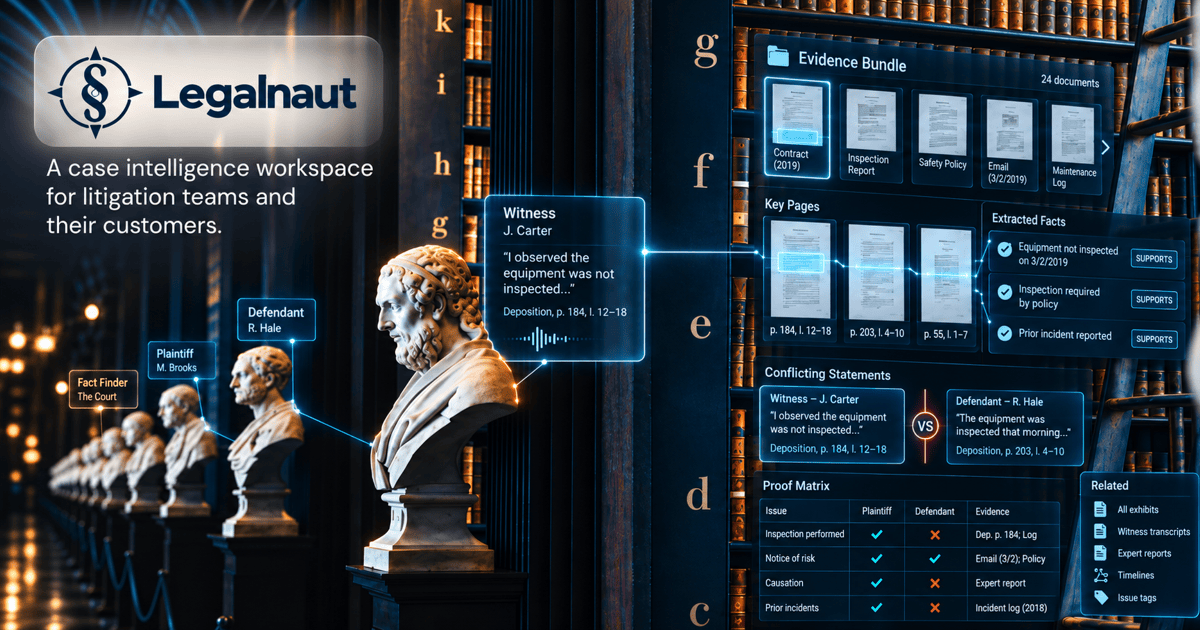
Legalnaut is a case intelligence workspace built for litigation teams and the clients they serve. A user uploads a matter's documents, such as archives, mailbox exports or scanned bundles, and the system processes each page in a background queue. Scanned material goes through OCR and audio or video is transcribed, after which language models pull out events, people, organisations and individual claims. Claims are compared across the file, and possible conflicts are presented side by side as suggestions that a lawyer must confirm. Results appear as a timeline, person profiles, a proof chart showing which issues lack supporting exhibits, and deadlines calculated from the relevant rule. An AI assistant answers plain-language questions, and both its answers and generated drafts are checked so that every cited document, page and quotation actually exists. Each matter is isolated from the others, and the tool does not provide legal advice.
Key Features
Source-linked chronology
Extracts dates and events from every document into a single timeline, with each entry naming the file and page it came from.
Contradiction detection
Breaks statements into individual claims, compares them with the rest of the file and shows conflicting pairs with both quotations for a lawyer to confirm or dismiss.
Proof chart
Lists each issue alongside the exhibits that support it and highlights issues where no supporting evidence has been found.
Citation-checked AI assistant
Searches by full text and meaning, reads long documents and mail threads, runs read-only queries for counts, and reports how many citations in each answer were verified.
Broad file ingestion
Accepts PDF, Office and OpenDocument files, email formats with attachments, archives, images and recordings, recognises file type by content and skips duplicates by checksum.
Hearing preparation tools
Builds witness dossiers, examination outlines and rule-based deadlines, and exports bundles and chronologies with user-defined exhibit numbers.
How Legalnaut works
Add the documents
Upload an archive, folder or mailbox export, or forward mail to the matter's address; the import screen shows the page count and filters duplicates first.
Background processing
Each page is read once in a queue, with OCR for scans, transcription for recordings and extraction of dates, people and claims that are checked against the existing file.
Work with the results
Review the timeline, profiles, contradictions, proof chart and deadlines, or ask the assistant questions that it answers with page-level citations.
Use Cases
- Updating a chronology after new disclosure
- A litigation team adds a fresh tranche of documents and gets an updated timeline without rebuilding it by hand.
- Testing a witness statement
- A lawyer reviews flagged conflicts between a witness statement and contemporaneous emails before cross-examination.
- Making scanned bundles searchable
- A paralegal imports a served bundle received as images so its text can be searched and cited during preparation.
- Checking evidence coverage
- Counsel uses the proof chart to see which issues still lack supporting exhibits ahead of trial.
- Preparing for an examination
- A litigator compiles a dossier on one witness and an examination outline drawn from everything the file holds about that person.
Things to know
- Not legal advice or e-discovery
- Legalnaut does not give legal advice, file anything with a court, or offer privilege review and review batching.
- Findings require lawyer confirmation
- AI-detected contradictions stay suggestions until a lawyer confirms them, and generated documents are labelled as working drafts that require review.
- Data handling
- Standard hosting is on servers in Germany, matters are isolated from one another, and model provider agreements prohibit training on customer content.
- Public demo limits
- The demo case is read-only, shared with other visitors, and anything typed into it is deleted within a day.
FAQs
What is Legalnaut?
Legalnaut is a case intelligence workspace for litigation teams that reads a case file and links every fact, event and contradiction to its source document and page.
What file formats does Legalnaut support?
Legalnaut reads PDF, Word, Excel, PowerPoint and OpenDocument files, RTF, plain text, Markdown, CSV, HTML, EML, MBOX and Outlook MSG emails with attachments, archives, images, and audio and video. Scans are processed with OCR and recordings are transcribed.
Does Legalnaut give legal advice?
No, Legalnaut does not give legal advice. Legalnaut organises what is in the documents, while interpreting facts and deciding next steps remains the lawyer's job.
How does Legalnaut prevent made-up AI answers?
Legalnaut checks every chat answer and draft against the records, confirming that the cited document, page and quotation exist. Anything that cannot be verified is reported rather than silently fixed.
Is my case file used to train AI models in Legalnaut?
No, Legalnaut's agreements with model providers prohibit training on customer content.
Can I try Legalnaut without signing up?
Yes, Legalnaut offers a read-only public demo based on the Epic Games v. Apple case that needs no account. It is shared with other visitors, and entries are deleted within a day.
Can two disputes share one matter in Legalnaut?
No, in Legalnaut each matter holds a single dispute with its own document database, storage and members. Nothing can be queried across two matters.
Who it's for
- litigation lawyers
- law firms
- paralegals
- legal support teams
- in-house legal teams
Comments
No comments yet. If you have used Legalnaut, tell other readers how it went.
Alternatives to Legalnaut
| Tool | Free plan | Starting price | API |
|---|---|---|---|
 LegoraCollaborative AI platform for lawyers with an agent, legal research, tabular document review and Word and Outlook add-ins. |
— | — | — |
 AI LawyerLegal AI assistant that answers legal questions in chat, summarises and compares documents, and drafts letters and clauses. |
— | — | — |
 ChatPDFChat with PDFs and other documents to get summaries and cited answers, aimed at students and researchers. |
Yes | — | Yes |
 Gemini NotebookGoogle's source-grounded AI research notebook, formerly NotebookLM, that answers from your files and turns them into overviews. |
— | — | — |
 IroncladAI contract lifecycle management platform for creating, reviewing, signing, storing and analysing contracts. |
— | — | Yes |
Listed in the same categories as Legalnaut. A starting price appears only where we checked it on the maker’s pricing page; a dash means not checked or not published. All Legal & Contracts tools