
Craiyon
Text-to-image generator with six style presets, an exclude field and credit-based image editing tools.
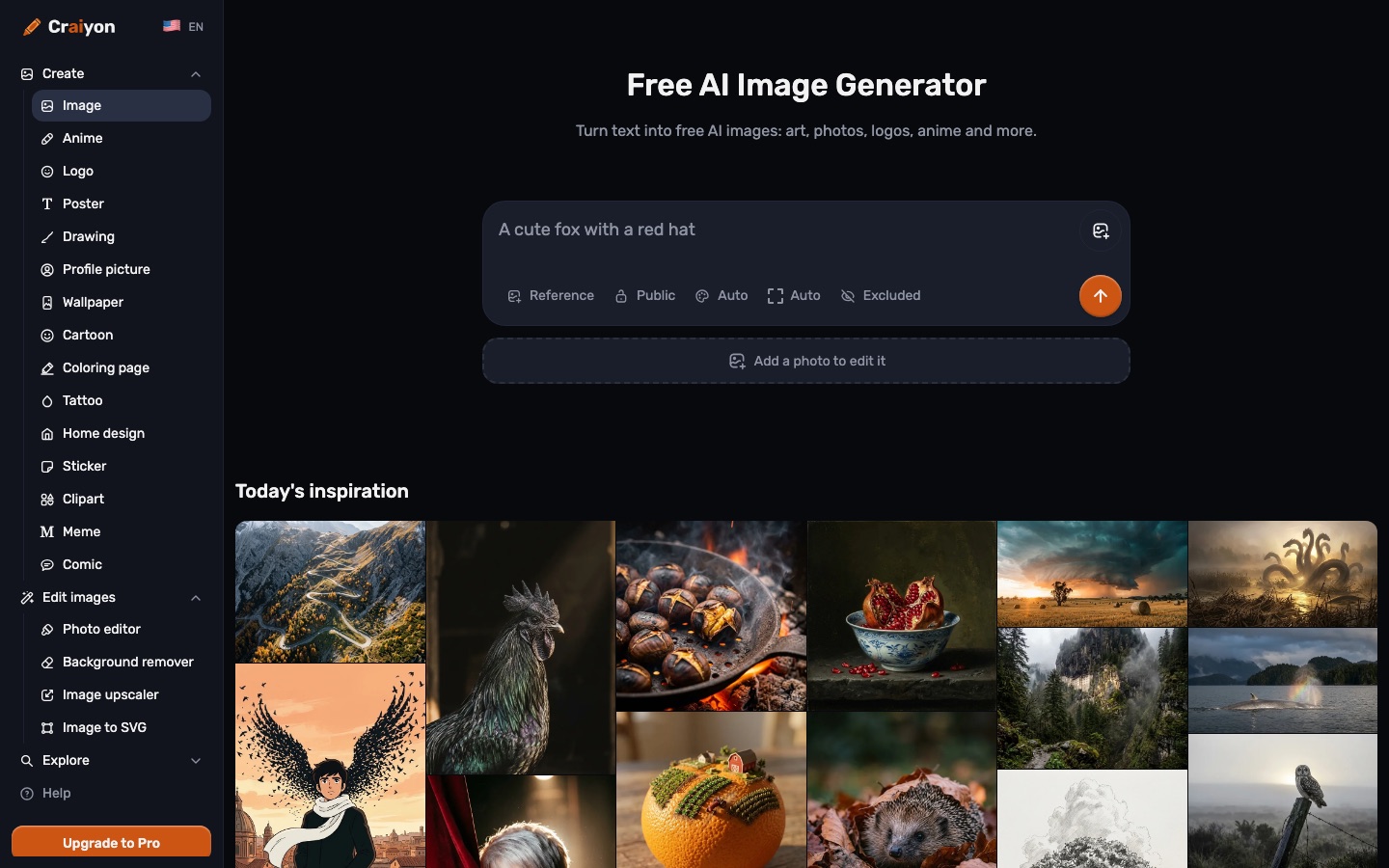
Craiyon is a browser-based AI image generator, formerly called DALL·E mini, that creates pictures from text prompts. Craiyon is used by typing a description, choosing a style preset and aspect ratio, and pressing the draw button. Free use is watermarked; paid plans add higher quality, private images and monthly credits for editing.
Best for People who want to try text-to-image generation without paying first, and creators who need quick drafts of logos, posters, stickers or illustrations.
- Listed in
- AI Image GeneratorImage Editing
- Platforms
- Web
- Pricing model
- Freemium
- Free plan
- Yes
- API
- No
- Made by
- Craiyon LLC
- Added
Last verified: . Information taken from craiyon.com.
What is Craiyon?
Craiyon is a web-based AI image generator that draws pictures from a written description. The service began in 2021 under the name DALL·E mini and took its present name in 2022. A prompt can be paired with one of six style presets (Artistic, Photo, Anime, Illustration, Vector or Raw), an aspect ratio, and a list of things the picture should leave out. Dedicated pages cover logos, posters, tattoos, stickers, colouring pages and similar formats, and a public gallery shows the prompt behind each image. Separate tools edit photos, strip backgrounds, upscale and convert pictures to SVG. Generating from text alone costs no credits; editing an existing image does. Free accounts get watermarked, base-quality output, while three paid tiers remove the watermark and add monthly edit credits.
Key Features
Text-to-Image Generation
Produces pictures from a typed description, with prompts accepted in languages other than English.
Six Style Presets
Switches the look between Artistic, Photo, Anime, Illustration, Vector and Raw without rewriting the prompt.
Exclude Field
Takes a list of concepts, such as people or text, that the model then tries to keep out of the result.
Aspect Ratio Control
Picks a format automatically from the prompt or lets you set square, landscape or portrait yourself.
Image Editing Tools
Offers a photo editor, background remover, upscaler and image-to-SVG converter that draw on edit credits.
Searchable Gallery
Lets you browse themed collections, open any picture to read its prompt, and look up similar images.
How Craiyon works
Describe the picture
Write what you want to see; the site advises adding detail because specific prompts give closer results.
Pick a style
Choose among the Artistic, Photo, Anime, Illustration, Vector and Raw presets.
Set the format
Leave the aspect ratio on automatic or select square, landscape or portrait.
Generate
Press the draw button and wait for the images to appear.
Refine
Adjust the wording, add unwanted elements to the exclude field, or start again from a similar image.
Use Cases
- Social Post Visuals
- Draft an illustration for a post or a concept before committing to a final design.
- Logo and Poster Drafts
- Use the dedicated logo and poster pages to try several directions for a small brand or event.
- Colouring Pages and Stickers
- Generate printable line art or sticker artwork from a short description.
- Tattoo and Wallpaper Ideas
- Explore a motif in several styles before taking it to an artist or setting it as a background.
- Retouching an Existing Picture
- Upload a photo and spend edit credits to change it, remove its background or enlarge it.
Things to know
- Free images need attribution
- Free users are asked to credit craiyon.com when they use an image, and their downloads carry a watermark.
- Credits apply only to editing
- Generating from a text prompt is not charged in credits; anything that takes an image as input is.
- Monthly credits expire
- Subscription credits reset on the billing date and unused ones are not carried forward, on monthly and yearly plans alike.
- Sales are non-refundable
- The pricing FAQ states that purchases are not refunded, while plans can be cancelled from account settings at any time.
FAQs
What is Craiyon?
Craiyon is an online AI image generator that turns a text description into pictures. It was launched in 2021 as DALL·E mini and renamed Craiyon in 2022.
Is Craiyon free?
Yes. Craiyon has a free tier, but free images are base quality, carry a watermark and can involve waiting during busy periods.
How much does Craiyon cost?
Craiyon: a free plan is available. Paid plan rates are published on craiyon.com. Check the official pricing page for current amounts.
Can I use Craiyon images commercially?
Yes. Craiyon allows commercial use on every account type under its Terms of Use, but free users have to credit Craiyon while subscribers do not.
Does Craiyon have an API?
No. The Craiyon pricing FAQ says there is no public API at present, though the company plans to offer one later.
Is there a Craiyon mobile app?
Not yet. The Craiyon FAQ describes a mobile app as coming soon, so the service is currently used in a browser.
How do Craiyon edit credits work?
Craiyon edit credits are spent when an image is used as input or retouched. Creating pictures from text alone uses none, and unused monthly credits do not roll over.
Who makes Craiyon?
Craiyon is run by Craiyon LLC. Its FAQ names Boris Dayma as chief executive and says the same core team has developed the model since the DALL·E mini days.
Who it's for
- Hobbyists
- Social media creators
- Small businesses
- Illustrators
- Students
Comments
No comments yet. If you have used Craiyon, tell other readers how it went.
Alternatives to Craiyon
| Tool | Free plan | Starting price | API |
|---|---|---|---|
 ImagineArtAI creative suite that generates images, video and audio from prompts, with studios for ads, film and fashion. |
— | — | — |
 Jimeng AIChinese-language AI creation platform for generating images and video, with a canvas editor and a community. |
— | — | — |
 PicLumenAI studio for generating and editing images, video and music with a choice of well-known models. |
Yes | $6.09/mo | — |
 ArchiVinciAI rendering tool that turns sketches, photos, floor plans and 3D model screenshots into architectural renders. |
— | — | — |
 CaimeraAI visual production platform for fashion brands, turning flat-lays and sketches into on-model images, videos and tech packs. |
Yes | — | Yes |
Listed in the same categories as Craiyon. A starting price appears only where we checked it on the maker’s pricing page; a dash means not checked or not published. All AI Image Generator tools