Görsel promptu Sahneler ve mekânlar Özelleştirilebilir Fotoğrafını ekle
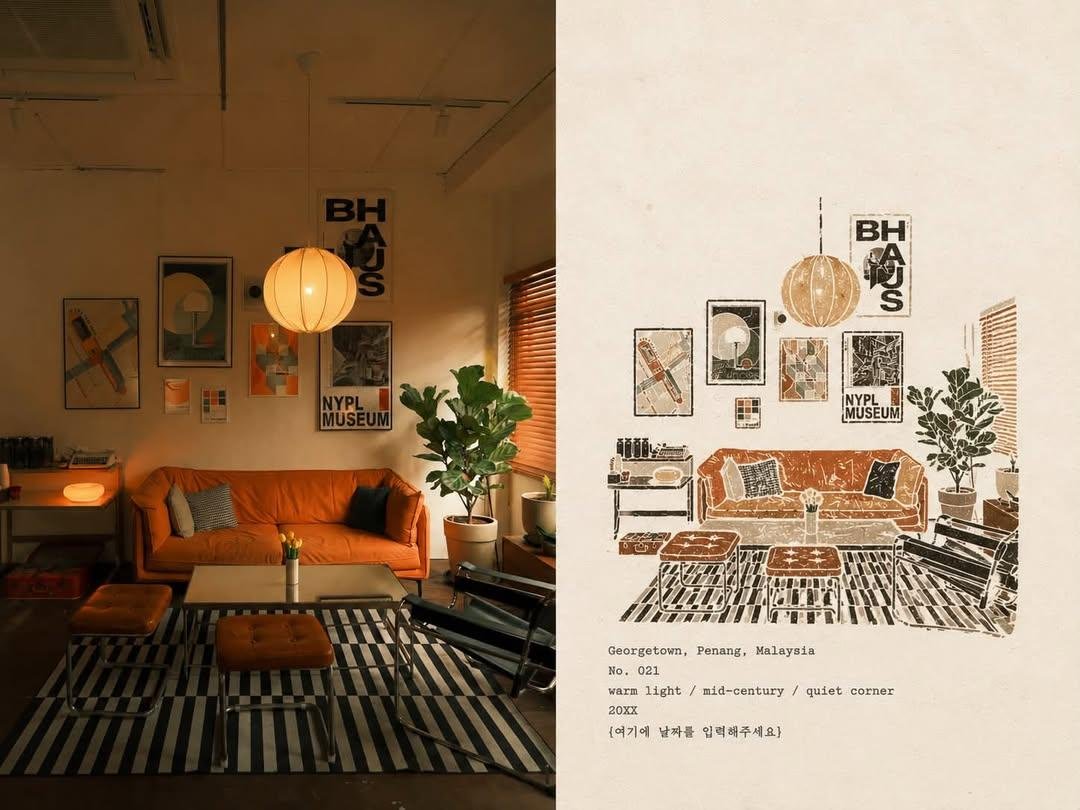
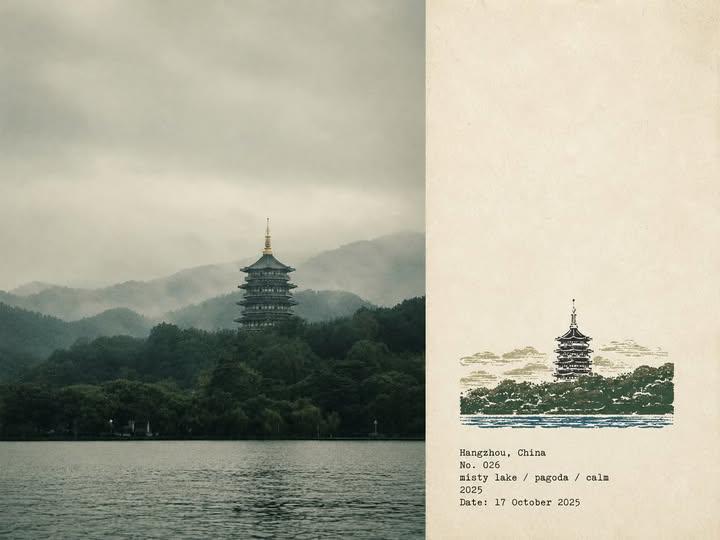
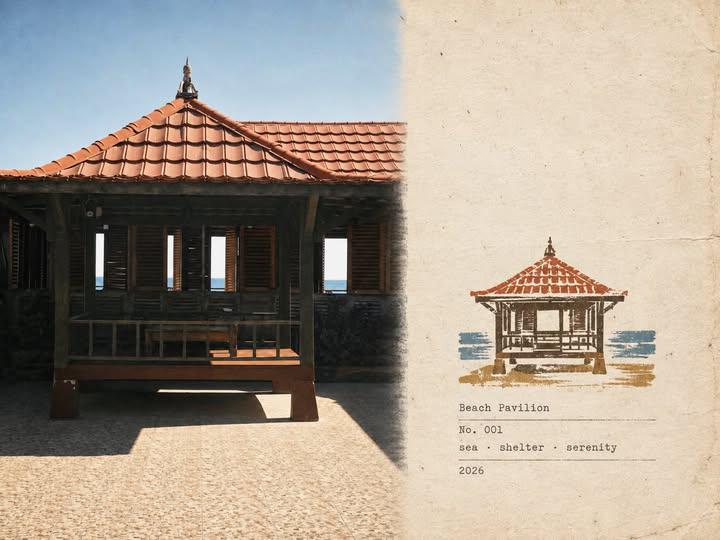
Oyma kauçuk damga ile seyahat fotoğrafı yanında saha notu
Solda bir seyahat fotoğrafı, sağda ise en tanınabilir hatlarının oyma bir kauçuk damgayla eski ve sıcak bir kâğıda basılmış hali yer alır. Geniş boş kâğıt alanları ve hafifçe kayık mürekkep, işin bir gezginin günlüğü hissini vermesini sağlar.

- Model
- GPT Image 2
- Tür
- 2 görsel
- En boy oranı
- 4:3
- Paylaşım
- 30 Ağu 2026
- X'teki beğeniler
- 78
Tarihinizi buraya girin
Görsel promptu
4,885 karakterPlease create a separate "Rubber Stamp Travel Field Notes Poster" for each photo I upload, outputting each photo individually without collage or multi-image combinations. Overall, use a 4:3 landscape composition, dividing the frame into left and right regions, but without drawing an obvious dividing line. The left side takes up about 58% of the frame, faithfully preserving the original photo. Accurately maintain the main subject identity, terrain, architecture, plants, people, spatial relationships, natural lighting and shadows, authentic textures, and the original color atmosphere; apply only restrained art publication-level photo color grading, and add extremely subtle, fine-grained film noise. For layout adaptation, natural cropping is allowed, but do not stretch, distort, shift, replace, or redraw the main subject. The right side takes up about 42% of the frame, using a warm off-white aged paper as the background. The paper features subtle fibers, natural grain, light usage marks, and a matte texture, while preserving large areas of unprinted paper whitespace, making the blank space an essential part of the layout. Analyze the original photo and extract the most location-distinctive subject outlines, architectural structures, terrain contours, plant forms, roads, shorelines, or other key visual relationships, compressing them into a small multi-color rubber stamp image. Do not replicate every single element from the photo item by item. Retain only the minimal information necessary to instantly recognize the original location, subject, and scene relationships. Remove crowds, vehicles, dense windows, repetitive buildings, fragmented vegetation, decorative elements, and irrelevant backgrounds. The stamp is positioned in the lower-middle of the right-side paper area, occupying only about 30%–38% of the right region's height, with ample whitespace preserved around it. The stamp must not be enlarged into a standard illustration, full landscape painting, or brand logo. Determine the stamp's organization based on the original photo's composition: * Iconic architecture: Retain the most distinctive outer contours, roofs, domes, arches, towers, or main structures. * Mountain settlements: Compress buildings into a few terraced color blocks aligned along the terrain. * Coastal scenery: Retain mountain contours, settlement layers, shorelines, and sparse intermittent water ripples. * City panoramas: Retain the main skyline, one iconic building, and one or two layers of distant mountains. * Natural landscapes: Retain primary mountain forms, trees, shorelines, or road orientations. * Foreground occlusions: If narratively important in the original photo, retain as foreground stamp outlines. Extract 2–4 spot inks from the original photo. Prioritize desaturated colors like carbon black, deep green, brick red, ochre yellow, slate blue, or taupe brown, but do not force a fixed palette. Preserve the most distinctive color character from the original photo, allowing only a small area of color for visual emphasis. Render each color as a separately hand-stamped effect: Authentic rubber stamp carving texture, hand-engraved marks, uneven line widths, contour notches, fractured edges, dry ink shortages, paper show-through, granular ink, uneven pressure, partial ghosting, and about 1–2 mm of subtle misregistration. Allow natural misalignment between color layers; edges must not be digitally smoothed. The print should resemble a real carved stamp pressed onto aged paper, not a filtered photo, smooth vector illustration, or line-art logo. Generate text based on the photo's location, theme, and visual imagery: Location English name No. Number Three short English keywords Gregorian calendar year Place the text below or adjacent to the stamp in the whitespace, using a small, restrained, slightly mechanically imperfect typewriter font. The typography should evoke a traveler's field record, not an ad headline. Ensure all text is spelled accurately, without adding irrelevant slogans, brands, or decorative copy. The overall vibe is like field notes kept by an architect, travel writer, or natural observer: quiet, restrained, tactilely real, regionally specific, with handmade imperfections and a collectible feel. The photo handles the on-site record; the stamp captures the most recognizable fragments of memory. The date should display the date I enter: [enter your date here] Avoid: Obvious central dividing lines, circular seals, Chinese red stamps, postage stamp perforations, wax seals, sticker collages, tourist souvenir templates, smooth vector logos, generic city icons, full replication of all architecture, dense detailing, childlike craftiness, cartoon style, 3D rendering, plastic textures, glossy digital gradients, oversaturation, excessive text, decorative clutter, and redrawing or altering the left-side original photo.
Nasıl kullanılır
Prompt her görseli ayrı bir çıktı olarak istediği için her çalıştırmada bir fotoğraf yükleyin. Prompt fotoğrafın yerindeki kaydı esas alır; bu yüzden tarih satırını ve konum ifadesini metin bloğunda tutun, çünkü saha notunu bunlar sabitler. GPT Image 2 promptu olarak paylaşıldı ve çalıştırmadan önce tarih yer tutucusunun kendi tarihinizle değiştirilmesi gerekir.
30 Ağu 2026 tarihinde X'te herkese açık olarak paylaşıldı. Bu prompt ve sonucunun tüm hakkı içerik üreticisine aittir. Bu sizin mi? Güncelleme veya kaldırma talep edin.